|
Curve display parameters |
Scroll |
There are two curve display parameters: line style and vertex style. You can configure the curve display parameters using the Displaying group of controls in the Properties section on the Parameter Panel.
By default, 3D curves are rendered using the Normal style. To modify the current style, use the Line Style list. This list contains system line styles.
To display the vertices of a spatial curve, please enable the Display vertices setting. When this setting is enabled, the vertex style list appears on the Parameter Panel. In this list, you can select the style for displaying vertices. After a curve is plotted, its vertices will be displayed using the selected style.
|
For a broken line with vertex fillets, end points of fillets are also selected, see figure. |

|
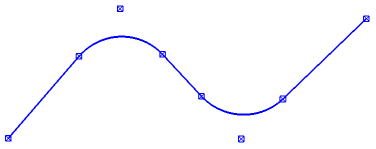
Displaying end points of broken line fillets
|
The drawing settings of the current curve what were defined at the time of its plotting, will be used to create subsequent spatial curves until the end of the session. |
You can modify the line thickness if needed. To do that, run the Settings – Parameters – System – Model Editor – System Lines command. A dialog box will appear where you can set the required thickness values.
