|
Passwords of Load Modes |
Scroll |
You can set passwords for system and custom assembly load modes.
A password protected load type is called a protected load type.
A password is requested when you attempt to do the following:
•open a protected assembly, open a subassembly of the assembly with a protected load mode using the command Edit component in window or Edit component in place,
•apply a protected load type,
•delete or edit a protected load type that is not an applied one,
•unlock component from being editing that was locked as a result of using a protected load type (locked editing in the Tree is marked with a shield icon).
When wrong password is entered, the system blocks execution of the above actions.
|
You can use a password of system load types instead of a password of any custom load type. |

The Figure shows a Password Request dialog box.
|
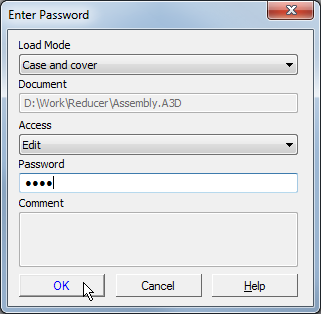
Load Mode Password request dialog box
Load Type and Access fields are only available when you open an assembly.
You can select a different load type from the Load Type list. If you selected a load type that is not password protected, the Password field becomes unavailable.
In the Access list, you can select an option to open a file: for editing or read-only.
A password for a load type is set when it is created or edited.
|
A password for an editable or applied load type is not requested if earlier a password for system load types was entered to unlock component from being edited (see section Preserving the lock on editing components in the assembly load type). |
