|
Names and numbering of tables |
Scroll |
In a graphic document, a table can have a name entered manually and/or number set automatically. The name and number are entered independently of one another. The procedure for entering a table name is described in this section; to learn about auto-numbering of items, see section Auto-numbering and auto-sorting of objects.
To set a name to the table, fetch the Name... command from the context menu of the table.
After fetching the command, a table name entry dialog appears on the screen. If a table, for example, an associative report, is split into several parts, then the dialog contains text input fields in a quantity equal to the number of tables (see the Figure).
|
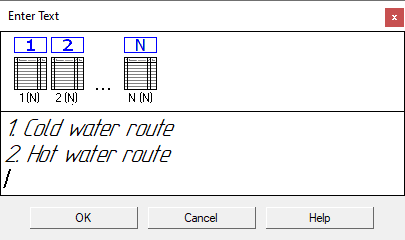
Dialog of input of names for an associative table
Enter a name for each table one after another into the fields of the dialog.
The string length may exceed the table width. In this case, no automatic narrowing of symbols or text wrap on a new row occurs. To split a name into lines use the <Enter> key, to move to the name of another table – use the <↑>/<↓> keys.
On the Parameters toolbar, available are elements, and in the menu – the commands allowing to work with text. Some commands can be fetched from the context menu of the input field of the dialog. For example, you can insert a special character, a symbol, change the parameters text formatting: the font, height, alignment, and indents of paragraphs, etc.
Having completed input or editing the names, press the OK button of the dialog. The dialog will be closed, and above the tables there will again appear the set or changed names.
To refuse input or editing the names, press the Cancel button.
The name text parameters and the distance from the name to the table in the current document can be configured:
•for simple tables – in the dialog fetched by the command Settings – Parameters – Current drawing / fragment – Table Parameters – Table name.
•for associative tables – in the dialog fetched by the command Settings – Parameters – Current drawing / fragment – Report table parameters – Table name,
•for BOMs displayed on a sheet – in a dialog fetched by the command Settings – Parameters... — Current Drawing — Document parameters — BOM name on sheet.
If automatic numbering was applied for the current table, then the number (it can also include text before number) is displayed in the dialog. Such a number is the reference to the number of table in a group of numbering and is unavailable for change. If required, the number-reference can be deleted. At the same time, automatic numbering of the current table will be canceled.
