|
Overview |
Scroll |
The rotation element is formed by rotating the section around the axis in one or both sides at a given angle. For example, the following figure shows an element formed by rotating a sketch 270° around an axis lying in its plane.
|
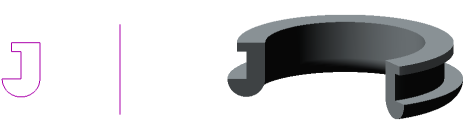
Sketch, axis and element formed by the revolve operation
The rotation element can be an independent solid, or it can be glued to the solid or cut out of it.
To create a new solid or to glue a rotation element to an existing solid (i.e., to add material), use the Revolution Element operation, and to cut a rotation element from the solid (i.e., to remove material), the Cut Rotation Solid operation.
A face, sketch, edge or spatial curve can be used as a section of the rotation element.
When rotating a face, a closed sketch (sketch area), a closed contour on the face, or a closed sketch contour, a choice is possible between a solid and a thin-walled element (see figure).
|
|
|
a) |
b) |
c) |

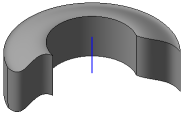
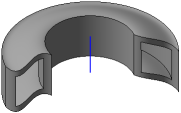
Rotation of the face: a) section and axis,
b) a solid element, c) a thin-walled element
With open section, as well as with the rotation of an edge or a spatial curve (including an Arbitrary), it is possible to build only a thin-walled element. An example of rotating a spatial curve is shown in the figure.
|
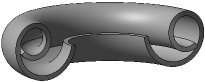
Rotation element with a spiral section
See Also
