|
Copying layers among views |
Scroll |
You can copy layers among the views of a drawing. While copying, the contents of source layers are ignored, i.e. Copying results in that new layers turn out to be empty.
Step-by-step instructions
1.Select source layers in the Drawing tree, i.e. layers which need to be copied.
2.Holding the <Ctrl> key, drag and drop the selected layers with the mouse onto the line of view in which layer copies should be placed. If the layer copies should be added into the group belonging to a view, drag the source layers directly onto the line of the group.
You can also copy groups of layers and groups of layer properties together with the layers contained in them among views. To that end, drag the groups in the Drawing Tree with the mouse, while holding the <Ctrl> key.
If under the cursor there is an object into which it is impossible to copy a selected layer (or group), then the background under the name of this object turns pink, and if possible, the background turns green, and before the name there appears the "+" sign.
For example, a group cannot be copied into itself or into the parent group, and a layer – into the view containing it.
When copying, control of layer numbers is performed. If in the view where layers are copied, there are layers with the same numbers as those of the copied, a warning dialog appears on the screen saying there is a coincidence of layer numbers (see the Figure). To continue work, select one of the options.
|
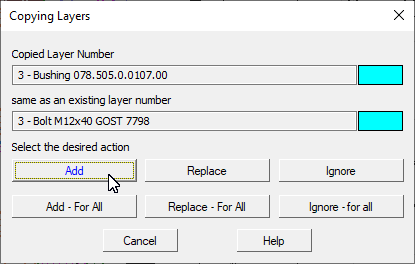
Warning on duplicate layer numbers
|
Presence of two and more system layers in a view (layers with zero numbers) is not allowed. Therefore, while copying a system layer from one view to another, the Add and Add – for all options are unavailable. |

