|
Copying component properties to an assembly document or insertions to a drawing/fragment |
Scroll |
Properties of assembly components (or of a drawing/fragment insertions) can be copied to the list of the current document properties. Use the following procedure.
1.In one of the dialog view windows Property Management Enable display of the list of properties of the current document. To do this, press the Show Document  button. In the image below — the right dialog window.
2.In the other window of the dialog box, enable display of the properties list of the current assembly components (or of the drawing/fragment insertions). To that end, press the Show document button and expand the Components group (or Insertions).
3.Select the required property in the properties list of components (or of insertions) and click the Copy to the right button  ./to the left
  (in the example provided below, copying to the right is performed). The component property will be copied to the list of properties of the current document.
|
In the group Components (or Insertions), there are those properties of components (or insertions) which differ from the properties of the current document. These properties are only available for preview and copy. |

|
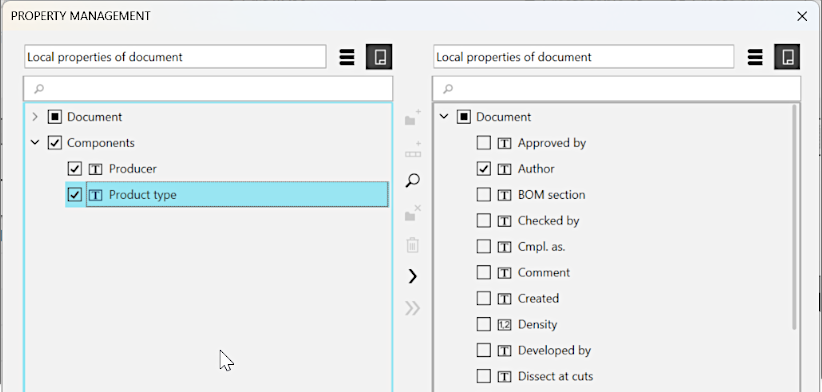
Example of copying component properties to the assembly properties list
