|
Overview |
Scroll |
KOMPAS-3D allows you to create a stamping in a sheet metal part by the shape of another solid existing in the model.
To build a stamping specify a flat face of the sheet part and a solid that intersects this face. The specified face will be the base face, and the solid will be the stamping tool.
Construction direction is the direction opposite the base face. The shape of the stamping is determined by the forming part of the solid used as tool body.

Base face and tool body
The solid selected as the stamping tool can be interpreted as a punch or matrix (see the figure).
|
|
a) |
b) |
|
|
c) |
d) |
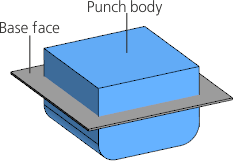
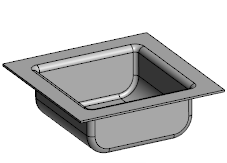
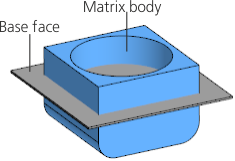
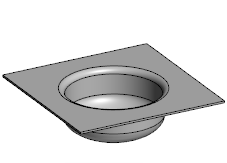
Creating the stamping with solid
a), c) source items, b), d) respective results of forming-up
The resulting thin-walled element obtained as the result of the deformation forms the side walls of the stamping.
If required, in the process of construction you can specify tool edges, in the place of which holes will be formed in the stamping.
The solid used in the operation can be hidden or can remain in the model. The created stamping retains the associative relationship with it.
See Also
