|
Dialog of parameters for inserting illustration into text |
Scroll |
Allows you to change the parameters of the insert illustration (drawing, fragment or image from a raster file) to text.
This dialog appears on the screen:
•when creating an insert (after the Parameters button is pressed int eh file opening dialog),
•When editing an already created insertion (after invoking the Edit — Edit Object command or after double clicking on the insertion).

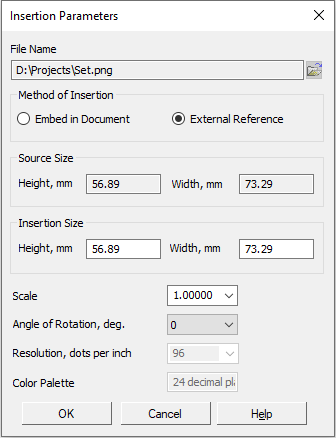
Description of Controls
Name |
Description |
|
File Name |
This field displays the name of the file selected for insertion. This field is for reference only and is not editable. To the right of the field is a button to select another file. It is available during editing and only for illustrations inserted by an external link. |
|
Embed in Document |
Selecting this paste method means that the contents of the selected file are physically copied into the document and will be stored there as a whole. Link to the source is not preserved. Changes made to the source file are not displayed in the document containing the insert. When you transfer this document to another workstation, the transfer of the source of insertion is not required. |
|
External Reference |
Selecting this insertion method means that only a link to source file without physically inserting the contents of the file. Changes made in the source file are displayed in all documents containing inserts. When transferring these documents to another workplace, the transfer of the insertion source is also required. |
|
Source Size |
These fields show the height and width of the image selected for insertion. These fields are for reference and are not editable. |
|
Insertion Size |
These fields display the current height and width of the image, taking into account the scale specified in the Scale field. For raster images, the resolution specified in the Resolution field is also taken into account. You can enter the desired height value (width) insert from the keyboard. The scale corresponding to the specified value will be determined automatically; (height) insertion will be multiplied by the resulting value. The calculation is performed with an accuracy of up to 0.01. The resulting scale value is rounded down. As a result, the final height value (width) may differ from the one originally entered. |
|
Scale |
The field that allows you to enter or select from the list the scale of the insert. Options are also available in the list by width and by height, allowing to fit the dimensions of the insert to the width or height of the page. After changing the scale, the insertion size is recalculated. |
|
Rotation Angle |
The list allows you to select the rotation angle of the insert. Angles that are multiples of 90 ° are available. |
|
Resolution |
Only for raster images. The field in which the current image resolution is displayed. Resolution is editable if in source file insert there is no permission information. After changing the resolution, the insertion size is recalculated. |
|
Color Palette |
Only for raster images. The field in which the color resolution of the image file is displayed. It is reference and not editable. |
|
Options Embed in Document and External reference are not available when editing parameters of an insert embedded in the document. |

After setting the desired insertion options, click OK. Click Cancel to discard all changes and close the dialog box.
