|
General Information |
Scroll |
KOMPAS-3D allows you to create the following stamping elements in the sheet part:
•open and closed dimple,
•beat,
•louver,
•strengthening edge,
•die form construction by shape of a different solid.
You can create die formed elements only on those portions of the sheet part that have a constant thickness (a sheet part may have a variable thickness as a result of merging two solids of different thickness).
To create a die form, beat or louver, you need a sketch built on the outer or inner flat face of the sheet part. The face containing a sketch of the die formed element is considered a base face of this element.
|
|
|
|
a) |
b) |
c) |
d) |
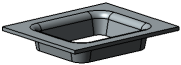
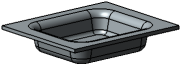
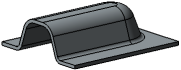
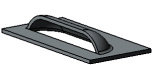
Stamping elements: a) open pressing,
b) dimple, c) beat, d) louver.
The strengthening edge is built on the bend of the sheet part.
|
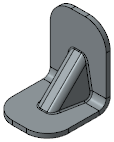
Strengthening Edge
For die form construction by shape of a solid, the model should contain a solid that intersects with the base face.
|
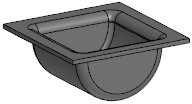
Stamping with solid
Creation of die formed elements actually belongs to deformation operations rather than bending because the sheet material is extended and its thickness decreases. In KOMPAS-3D this change of thickness is not accounted for when die formed elements are created in the sheet part.
Die formed elements have no bends, therefore, their unfolding is not possible.
Creation of die formed elements is described later in this section.
