|
Specifying operation parameters in the Parameter Panel |
Scroll |
When invoking most of object creation commands you need to specify various parameters of these objects.
For example, after invoking the command to construct a circle you should specify its center position and radius, and after invoking the command to construct an extruded solid you should specify the extrusion direction, depth and the slope value.
During the development of models and drawings using KOMPAS-3D, all parameters of the created objects are displayed on the Parameter Panel. Each parameters has one corresponding control of the toolbar (see figure).
|
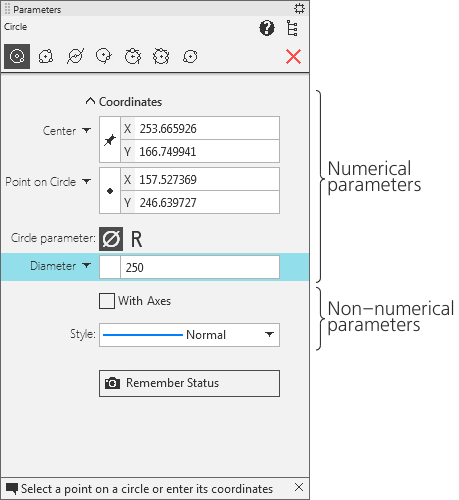
Parameter panel during constructing a circle
Parameters can be divided into numerical (point coordinates, length, angle, number of vertices etc.) and non–numerical (line style, presence of symmetry axes etc.).
While non–numerical parameters of an object can be specified using only one method – by selecting the desired option in the Parameter Panel, for specifying numerical parameters there are multiple options.
•The first, most simple and demonstrable method to specify parameters is specifying the needed points in the graphic area (see figure Specifying points). This method can be used mostly for graphic objects, as among 3D objects there are rather few such ones whose parameters could be set by specifying just points.
•The second method is to enter parameters in the predefined order, which allows to manage object parameters more flexibly (see section Entering numerical parameters in the predefined order). This method is available when creating most objects – both graphic and 3D ones.
•The third method is to assign parameter values in the Parameter Panel, which lacks demonstrability but is versatile and can be used when creating objects of all types (see section Entering parameter values into fields).
All these methods to specify object parameters can be combined.
Hereinafter when describing commands to construct objects the word "specifying" will mean specifying some element with the cursor in the working field (i.e. setting the cursor on that object and clicking with left mouse button), and the word "setting" will mean setting parameters using any method.
|
The sections dedicated to creating objects describe the simplest and frequently used ways. This applies both to the method and to the sequence of specifying object parameters. For example, to plot a line segment, you should in any way specify its length, direction and position. This can be done, for example, the following way: enter the first point coordinates, then enter the slope angle to the X axis of the current coordinate system, and finally specify the end point of the segment using the mouse. Of course, this method is as correct as any other way; moreover, in some cases it may be the only option possible. However the line segment plotting description mentions only two main methods of construction: by two points and by point, length and angle, as these are the simplest and the most used methods. |

