|
Additional possibilities when building an array |
Scroll |
The array can be automatically dimensioned. To do this, enable the Show sizes option on the Parameter panel.
When creating an array, the system will dimension the following:
•for an array by grid — the distance between instances in the first and second directions of the grid (see Fig. a),
•for an array by concentric grid — the linear dimension between instances in the radial direction and the angular dimension between instances in the annular direction of the grid (see Fig. b).
|
If an array on a concentric grid has an angle of 360° between the extreme instances, then the angular dimension is not created. |

The size is indicated between adjacent or extreme copies, depending on which version of the interpretation of the distance between copies is chosen in the corresponding direction of the grid.
|
|
a) |
b) |
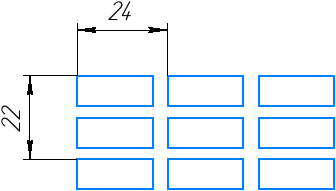
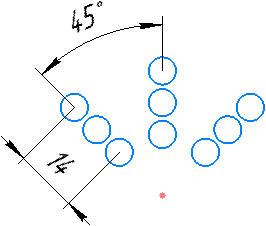
Sizes set automatically:
a) to the array by grid, b) to the array by concentric grid
Sizes created together with the array are control sizes, i.e. they allow changing its parameters, regardless of whether the parametric mode is enabled or disabled.
If the array size was deleted during subsequent editing, it can be restored. To do this, edit the array containing it, enabling the Show sizes option.
Working with characteristic points
During the building of the array, you can change the parameters of the grid by moving its characteristic points. The characteristic points of the array have different purposes and different shapes.
Characteristic points of the array by grid:
•A point  allows you to set the number of array instances in the corresponding direction. Displayed if the distance between adjacent copies is specified.
•A point  on the grid axis allows you to set the distance between array instances in the corresponding direction. Displayed near the first or last copy if the number of array copies in this direction is greater than one.
•A point at the end of the first grid axis allows you to set the angle of inclination of the first axis to the abscissa axis of the current coordinate system.
•A point at the end of the second axis allows you to set the angle between the grid axes.
Characteristic points of the array by concentric grid:
•A point in the center of the grid allows you to set the position of the center of the array.
•A point on the first circle of the grid allows you to set the number of array instances in the annular direction. Displayed if the angle between adjacent rays of the grid is specified
•A point on the last circle of the grid allows you to set the number of array copies in the radial direction. Displayed if the distance between adjacent grid circles is specified.
•A point on the first grid circle allows you to specify the angle between radial lines. Displayed if the number of array instances in the ring direction is greater than one.
•A point on the second grid circle allows you to specify the distance between circles. Displayed if the number of array instances in the radial direction is greater than one.
|
|
a) |
b) |
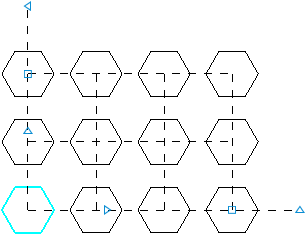
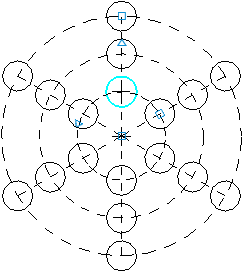
Characteristic points: a) array by grid, b) array by concentric grid
To move a grid feature point, move the mouse pointer to it. The cursor will change to a four-sided arrow  . Press the left mouse button and without releasing it, move the characteristic point. Then release the mouse button.
