|
Borders of the projection curve |
Scroll |
You can plot a projection of the base curve within the contour of a face (the projection curve will be cropped at the contour of the face) or on the theoretical surface of the face.
So select one or another plotting option, use the Border trimming setting.
•When this setting is enabled, the projection of the base curve is only plotted inside the contour of the face. If a set of faces is used as projection surface, then the projection of the base curve is trimmed along the contour of each face in the set.
•When this setting is disabled, the entire projection of the base curve is plotted. The base curve is projected onto the theoretical surface of the face. The theoretical surface of the face is extended if needed.
|
Please note the following concerning the projections: •A projection of the base curve on a plane is always plotted entirely. •If an axis was selected as a base curve, its projection is always plotted within the contour of the projection surface. In both cases, the Border trimming feature is not available. |

For more details on the theoretical surface of a face, see Section Parametric representation of the surface. Isoparametric curves Add-Ons Curves and Surfaces. You can see several ways to plot the projection of a sketch line (base curve) onto a face with a hole on the picture.
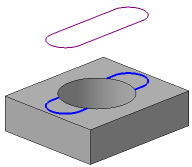
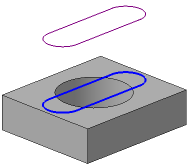
Result of projecting a sketch line to a face with a hole
a) Border trimming is enabled, b) Border trimming is disabled
