|
Specifying a horizontal/vertical line as the angle second side |
Scroll |
In some cases, a document only includes one side of the dimensioned angle while the other side is represented by a vertical or horizontal line (see the figure).
|
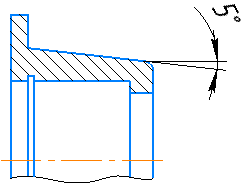
Angular dimension: one side of the angle is a projection of the conical face of the part,
the other side is a horizontal line
To set an angular dimension in this case, follow these steps.
1.Set the first side of the angle using a segment or two points.
2.Click the Auxiliary Line Selection  button on the Parameters Toolbar. It is located to the right of the Objects field.
3.Move the cursor to the end of the set angle side which is also the angle vertex.
You will see phantoms of the horizontal and vertical lines going through the selected point in the graphic area.
4.Click the appropriate phantom.
5.Set position of the dimension line and text.
It will create an angular dimension with both dimension lines starting in the angle vertex.
|
Horizontal and vertical directions are determined: •in a fragment – by axes of the absolute coordinate system, •on a drawing – by axes of the current view coordinate system. |

