|
Calculating the sum of the values in the BOM |
Scroll |
When configuring some columns of the BOM form and additional columns containing numerical data, it may be possible to add the values in these columns.
To add the numerical values in the columns, call the command Add Values.... .
.

In the Information window that appears on the screen (see figure), you will see the results of the summation. The summation will be performed according to the style settings of the current BOM.
In the BOM style settings dialog box, you can disable or enable summation, as well as specify whether the number of objects should be taken into account in the summation. When summing the values in the columns of the group BOM, the result of the command version will be the sums of values for each version.
|
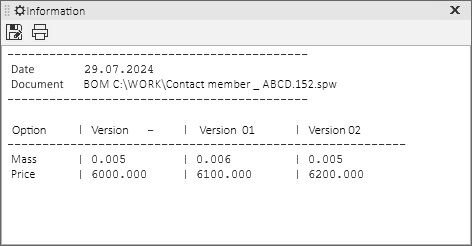
Information window with summation results
It is available to write the summation resultsto a separate text file. To do this, click the Save  button in the window with results and enter a file name.
With the Sum values ... command you can calculate the mass of an assembly unit or its value (provided that the corresponding additional column of each object is filled in). These examples do not exhaust the possibilities of using this command.
