|
Overview |
Scroll |
You can collapse a curve onto a nonplanar surface or unfold a curve from a surface to a plane. An unfoldable nonplanar surface, such as a cylindrical or conical surface of rotation, an extrusion surface, a ruled surface, etc., can be used as a surface for curve folding or unfolding.
An unfoldable surface is a surface whose Gaussian curvature is zero. The curvature of any surface can be checked with the Curvature check command (to estimate the Gaussian curvature, in the check command you must set the Curvature map switch to I (on) and in the Method field select the Gaussian representation option).
Collapsing is the transfer of a selected curve to a non-planar surface. As a result of collapsing, a new curve of such shape is built on the surface that it corresponds to the original object on the sweep of this surface. This allows you to draw an inscription or logo, tool path, groove contour, etc. on a model face. In addition to curves, points can be transferred to the surface.
|
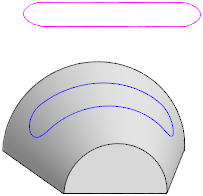
A sketch collapsed to a conical face
The object to be transferred to the surface can be:
•a 3D curve (including an array instance),
•the whole sketch or separate curves in it,
•an inscription in the sketch,
•an edge of a body or surface,
•a vertex of an object or a point in space,
•a point in the sketch
Curve unfolding is a process inverse to collapsing.
Unrolling allows you to obtain a unfolding of curves and points belonging to a surface to the plane.
|
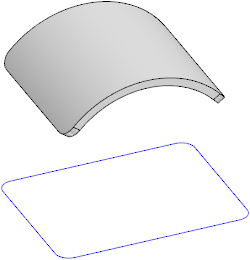
Edges of a face unfolded to the plane
A new curve is built in the model as a result of folding or unfolding. The resulting curve(s) is associatively linked to its original object, so that when the original object changes, the shape of the curve changes.
See also
