|
Overview |
Scroll |
During modelling, you can transform a solid (or multiple solids) to a shell. A shell is an empty object with constant or variable wall thickness.
To create a shell, you should specify one or multiple faces of the solid which should not be added with material. These faces will turn into one or multiple holes in the resulting shell. Other faces of the solid will be added with material layer forming the shell. Layer thickness may be constant or change from one face to another.
|
When working with a solid consisting of multiple parts, you can delete faces from some of them. These parts are transformed into shells with a hole, and the rest are transformed into closed shells. |

|
|
a) |
b) |
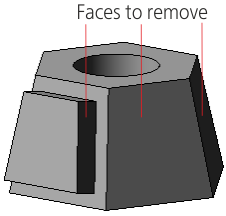
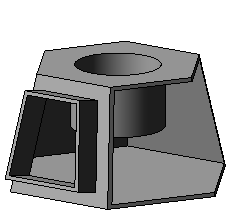
Creating a shell
a) the original part and the faces to delete, b) the shell creation result
See Also
