|
Wall thickness |
Scroll |
The pipe element can be solid or thin-walled.
The pipe wall thickness can be set by entering the thickness value or by specifying the value of the second diameter. The switch is used to select the required method. Wall thickness/Diameter 2 in element group Thickness determination.
•To set the thickness value, set the switch to the position Wall thickness. A switch will appear on the Parameter panel Inward/Outward. Specify the direction in which thickness is added - inward or outward. To do this, set the switch Inward/Outward in position Inward or Outward. In field Thickness enter the thickness value.
•To set the value of the second pipe diameter, set the switch Wall thickness/Diameter 2 in position Diameter 2. In field Diameter 2 enter the value of the second diameter.
If you want to create a solid element, enter a value of zero.
|
|
a) |
b) |
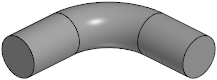
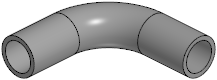
Pipe element: a) solid, b) thin-walled
