|
Displaying of the component in the Design Tree |
Scroll |
Components added to the model by mirroring or symmetrical insertion are displayed in the Design Tree under the Components section.
They have icons similar to icons of components of the same type (part, assembly, etc.). If a component is a mirrored version of the original one, then its icon is displayed in a mirrored view (see figure).
Component pictograms may display icons similarly to other objects in the Tree.
|
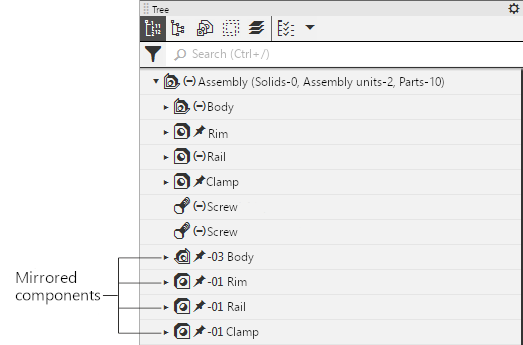
Displaying mirrored components in the Design Tree
Component names are generated automatically based on the settings. If necessary, you can change a component's name in the Tree using the usual methods.
The hierarchical arrangement in the Component Tree of components created by mirroring or symmetric insertion is the same as that of components created by other methods.
If the added component is a mirrored version or a mirrored/symmetrical insertion of the original component, a separate branch is formed in the Construction Tree under the Components section (or within a group, if grouping is enabled), which includes the original component and the component resulting from the reflection. Similar branches are created when copying components or creating an array of components; see the figure.
For more information on how objects are displayed in the Storyboard, see the section titled Object Names and Icons in the Storyboard.
Components obtained by mirror reflection have a left-handed coordinate system. Details on how coordinate systems are represented in the Model Construction Tree are provided in the section titled Right-handed and Left-handed Coordinate Systems.
Since mirroring components is one way to add components to a model, only the added components themselves appear in the Construction Tree; the mirroring operation is not created in the Tree.
