|
Overview |
Scroll |
The revolution element is formed by rotating the section around the axis in one or both sides at a given angle. For example, the following figure shows an element formed by rotating a sketch 270° around an axis lying in its plane.
|
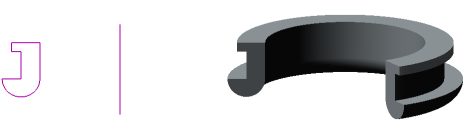
Sketch, axis and element formed by the revolve operation
The revolution element can be an independent solid, or it can be glued to the solid or cut out of it.
To create a new solid or to glue a revolution element to an existing solid (i.e., to add material), use the Revolution Element operation, and to cut a revolution element from the solid (i.e., to remove material), the Cut revolution solid operation.
A face, sketch (area in a sketch), edge, spatial curve (including a contour), or a combination of these objects can be used as the cross-section of a revolution element.
When rotating a closed cross-section, such as an edge, a closed sketch (area in a sketch), or a closed flat curve, you can select between a solid and a thin-walled element. The figure shows an example of building a revolution element with an edge as its cross-section.
|
|
|
a) |
b) |
c) |
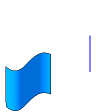
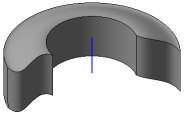
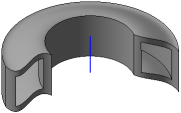
Revolution of the face:
a) section and axis b) a solid element, c) a thin-walled element.
For open sections, such as ribs or non-planar curves, only thin-walled elements can be constructed (an example of the revolution of a non-planar curve is shown in the figure).
|
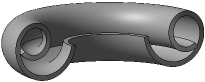
Revolution element with a spiral section
If the cross-section is a flat open object (or objects) and the axis of revolution lies in the plane of the cross-section, you can select between two types of construction: toroid or spheroid. When constructing a spheroid, you can create either a solid or a thin-walled element.
See also
