|
Examples of using auto centerline |
Scroll |
Using the Auto Centerline command, you can build images of the centerline on drawings performing minimum number of actions.
Example №1: Drawing a straight center line on a drawing. Clicks 1 and 2 specify the line segments that define the position of the axis line; clicks 3 and 4 specify the line segments that serve as the boundaries of the axis line.
|
a) |
|
b) |
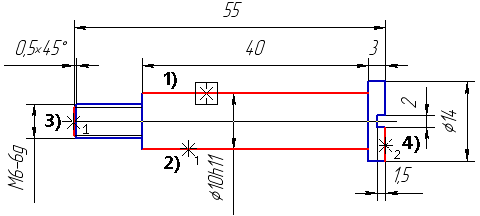
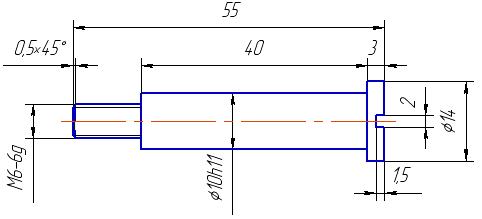
Building a centerline on the drawing using the With specifying borders method
a) indication of objects for building a centerline, b) built centerline
Example 2: Constructing an arc-shaped centerline on a drawing. Clicks 1 and 2—select the objects that define the position of the centerline. Clicks 3 and 4—select the curves that serve as the boundaries of the centerline.
|
|
a) |
b) |
|
|
c) |
d) |
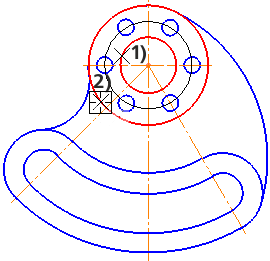
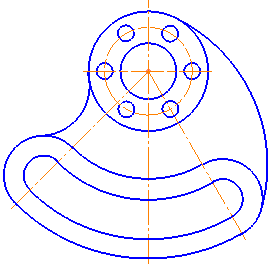
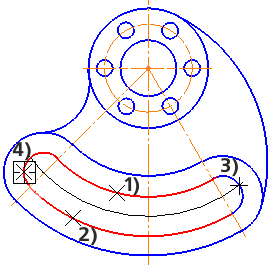
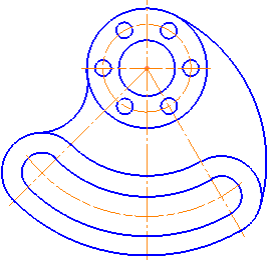
Building arc centerlines on a drawing
a), b) using By objects
c), d) using With specifying borders
Example No.3: building a designation of the center using the Auto Centerline command.
|
|
|
a) |
b) |
c) |
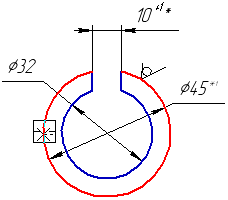
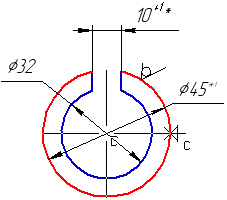
Building a designation of the center on the drawing
a) indication of an object, b) setting the position of the center mark, c) the built designation
