|
Bend release |
Scroll |
The elements are available in the Bend by Sketch (on building a bend along one edge) and bend.
Bend release means slots in the sheet solid located on the sides of the bend.
Release may have rectangular or rounded shape. Release dimensions are defined by the relief depth and width (see Figure).
|
|
a) |
b) |
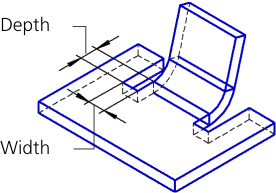
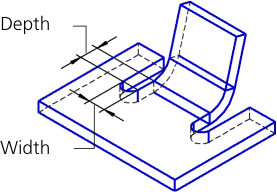
Bend release: a) rectangular, b) rounded
Release parameters are set in the Release section.
1.Set the Bend release toggle switch to I (enabled). The controls to configure release will appear on the Parameters toolbar.
2.Set the relief parameters.
•Select the type of release by clicking the required button in the Type group:
 Rectangular,
 Rounded.
•Enter values of the release depth and width in the Depth and Width fields. Only positive or zero values are allowed.
•Set the position of the reliefs relative to the bend using the option Account for bend width. With the option enabled, release widths are included in the bend width (the actual bend width decreases); with the option disabled – not included (the bend width does not change).
|
|
|
a) |
b) |
c) |
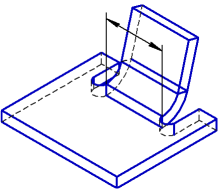
Release positions
a) width of the bend without reliefs, b) releases are included in the bend width,
c) releases are not included in the bend width
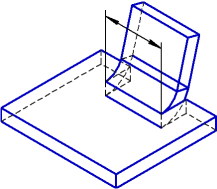
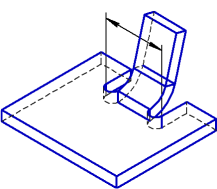
If the bend angle is not zero, the bend release rotates (see figure). The rotation angle of the release is equal to the angle on the bend.
|
|
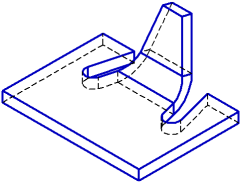
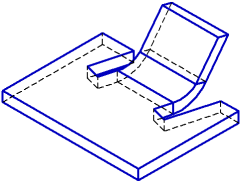
Bend release with an angle on the bend that is different from zero
The release depth is plotted along the side face of the unfolded bend, and the release width – perpendicular to this face.
|
|
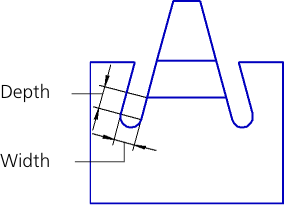
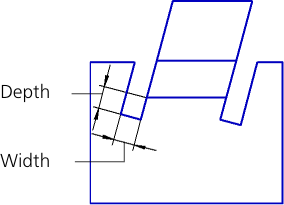
Defining sizes of bend release with an angle on the bend that is different from zero
