|
Control of variables of an inserted file |
Scroll |
The list of external variables of a file being inserted — a fragment or a component — is displayed as a table in the Variables section on the Parameter panel.
|
The external variables in an inserted file may include informational variables. These cannot be modified, but they are displayed when a fragment is inserted (see figure); however, they are not displayed when a component is inserted. |

|
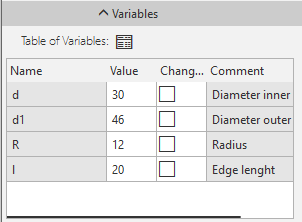
External variables of the file inserted into another document
The table row labels correspond to the names of external variables. Each row contains the parameters for a single variable. The variables have the values they had at the time the file being inserted was last saved to disk.
To change a variable’s value, click in the Value cell. Enter the new value and press the <Enter>.
In the value of a variable has changed, a «check mark» will be displayed in the Changed column opposite its name. .
will be displayed in the Changed column opposite its name.
To return the value stored in the source file to a variable, click this "check mark" icon.
The Table of Variables  button is displayed in the Variables section if the inserted file contains table of variables.
After pressing this button, the Table of Variables dialog appears on the screen. In the table, select the required row and close the dialog by pressing the Set values of variables button. External variables of the file being inserted will get the values written into cells of the selected row.
Changes of the values of variables immediately are reflected in the phantom of the inserted file in the graphic region.
See Also
