|
Borders of the projection curve |
Scroll |
You can plot a projection of the base curve within the contour of a face (the projection curve will be cropped at the contour of the face) or on the theoretical surface of the face.
So select one or another plotting option, use the Border trimming setting.
•When this setting is enabled, the projection of the base curve is only plotted inside the contour of the face. If a set of faces is used as projection surface, then the projection of the base curve is trimmed along the contour of each face in the set.
•When this setting is disabled, the entire projection of the base curve is plotted. The base curve is projected onto the theoretical surface of the face. The theoretical surface of the face is extended if needed.
|
Please note the following concerning the projections: •A projection of the base curve on a plane is always plotted entirely. •If an axis was selected as a base curve, its projection is always plotted within the contour of the projection surface. In both cases, the Border trimming feature is not available. |

General information about the theoretical surface of a face is provided in the section Parametric Representation of a surface. Isoparametric curves in the Curves and Surfaces add-on. The figure shows different ways to project a sketch line onto a face with a hole.
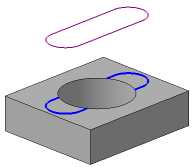
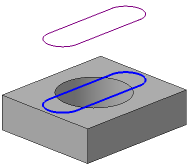
Result of projecting a sketch line to a face with a hole
a) Border trimming is enabled, b) Border trimming is disabled
|
Sections of the projection curve added when the option Extend along projection direction is enabled, are constructed only within the boundaries of the faces, not on their theoretical surfaces. Therefore, enabling or disabling the Border trimming option does not affect the construction of these sections. |
