|
Converting into spline |
Scroll |
Transforming a geometric object or text into spline is done using the Convert into spline  .
.
Such a transformation may be needed for the subsequent flexible editing of the object by moving its characteristic points.

Step-by-step instructions
1.Select the type of the curve to transform the object to. To do this, click the appropriate button in the Curve Type group of the Parameter Panel:
 Spline by poles
 Spline by points
2.If you chose converting into spline by points, set the approximation parameters:
•select the approximation method from the Curve approximation list:
•Approximation by bulge arrow
•Approximation by tangent angle
•set the approximation precision in the Approximation pitch field.
3.Specify the object to transform.
The transformation will be automatically completed. A message on that appears on the screen.
4.To complete operation of the command, click Finish  .
.
Notes on converting
•Some object cannot be converted into one spline without multiple points. The result of converting of such object is a contour consisting of several splines without multiple points.
•The converting is impossible if the original object and the curve it is converted to are a curve of the same type.
•In some cases converting text to spline may be performed incorrectly, the message Text converting was not completed is displayed on the screen. A converting error may be caused by different reasons, for example specifics of the font used. To eliminate the error, it is reasonable to select another font for the text.
•The result of converting text into curves depends on the type of the font being used. So, processing TrueType fonts creates contours of letters, and processing vector fonts creates sets of line segments composing characters (see figures).
|
|
a) |
b) |
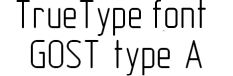
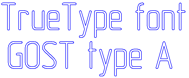
Converting a TrueType font text to a spline
a) the original object – the text, b) the converting result
|
|
a) |
b) |
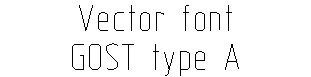
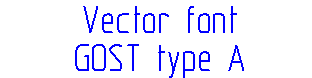
Converting a vector font text to a spline
a) the original object – the text, b) the converting result
