|
Colors in the interface |
Scroll |
Colors used in the KOMPAS-3D interface can be selected using the Interface Settings button, located in the system's Main Menu bar, see the image.
|
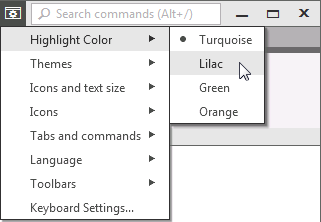
Interface settings button menu
To customize a color, use the following commands in the menu of this button:
•Highlight Color – allows to select the color to highlight interface items (buttons, fields, lists, etc.) while working with them. Available options:
•Turquoise,
•Lilac,
•Green,
•Orange.
•Themes — allows to select a color scheme for the KOMPAS-3D window as a whole. Available options:
•Light,
•Dark,
•According to OS theme - automatic window color scheme change in KOMPAS-3D when switching Windows themes (this option is available on computers running Windows 10 and 11).
•Icons – allows to select the version of images for the icons in the Toolbar Panel. Available options:
•Monochrome,
•Color.
This setting will apply to all windows KOMPAS-3D.
