|
Dialog Box: Sheet Size |
Scroll |
The dialog allows to select a sheet size from a standard row or to set any sizes of sheets.

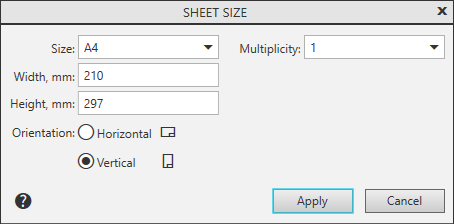
Sheet format settings dialog controls
The element |
Description of setting |
|
Size |
List for selecting the sheet format. Contains designations of standard formats and the Custom string. |
|
Multiplicity |
A field for selecting the multiplicity factor for the sizes of the sheet relative to the standard format. Present in the dialog if one of the standard formats is selected in the Size list. |
|
Width, mm Height, mm |
The fields display the current dimensions of the sheet sides (taking into account the multiplicity). Manual change of standard values automatically switches the format to Custom. If you need to return to the standard format, select it from the Size list again. |
|
Orientation |
The group of options allows to select variant of orientation of document sheets Horizontal or Vertical. |
Having completed the setup of the sheet size, press the Apply button. To exit the dialog without saving changes made, press the Cancel button.
