|
Variants for placing dimensions between circles or between a point and a circle |
Scroll |
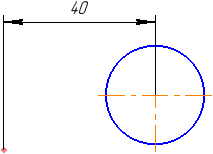
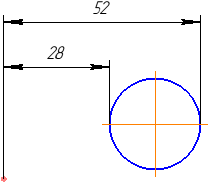
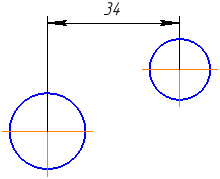
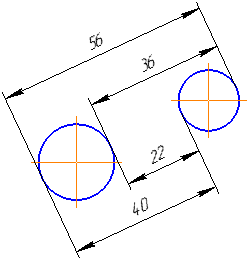
If a dimension is placed between two circles, two arcs, a circle and an arc, or a point and a circle/arc, you can choose how to place it: a dimension between the centers of the circles/arcs (or between a point and the center of a circle/arc—for a dimension between a point and a circle/arc) or a dimension whose extension lines are tangent to the circles/arcs.
The desired option is selected using the buttons Previous Result  and Next Result
  in the group Result selection. This group of buttons appears on the Parameters panel after the second object is selected. When you click the buttons in this group, the dimensioning options will be displayed sequentially in the graphics area (see tables).
Variants of placing a linear dimension between two circles/arcs
Description of variants |
Examples |
|
Dimension between centers of circles/arcs |
|
|
Dimension with extension lines tangent to circles/arcs |
|
|
Dimension between concentric circles/arcs |
|
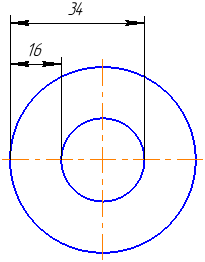
Variants of placing a linear dimension between two circles/arcs
Description of variants |
Examples |
|
Dimension between centers of circles/arcs |
|
|
Dimension with an extension line tangent to a circle/arc |
|