|
Select Component Load Type |
Scroll |
You can select a load type for the component at any level of assembly.
To change a component load type (parts and subassemblies), start the corresponding Load Mode command:
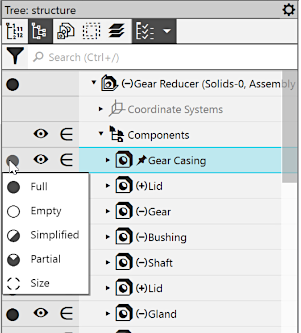
 Full,
Full,
 Empty,
 Simplified,
 Partial,
 Size.
Size.

The Fig. shows the way to select a load type from the component load type menu in the Assembly Design Tree.
|
Select Component Load Type |
You can change a load type for several similar components, all objects of the Components section, all components of the subassembly, a group or a branch of components. Select components, a section, group, etc., and start the command from the context menu.
|
Changing a load type of one instance of the array will be applied to the other instances and the initial component. Changing a load type of one component insertion (including a standard item) will be applied to the other insertions of this component in the current assembly. |

Please note the following while changing a load type.
•Load types are listed in descending order of detail – Full, Partial, Simplified, Outline, Empty.
You can change a component load type to either Full or less detailed compared to the applied one.
For example, components with an Empty or Size load type cannot be loaded with a Simplified or Partial load type. To execute such load, first load components fully, and then in a simplified way.
•You cannot apply a less detailed than applied load type to a component when its file is open in a separate tab. For example, you cannot load a component-part if its source file is open.
•You can apply any load type to a component-subassembly if this load type was earlier created in its source file. If you select several components-subassemblies to execute the command, you must bear in mind that the load type will be applied to all selected components-subassemblies that have a load type with the given name in their files. In this case, each subassembly will be loaded separately using a load type that was specially created.
|
Components-subassemblies are references to the corresponding files. Therefore, with open model files, any changes in load types (e. g. create, edit or apply) in the file of a subassembly are transferred to its assembly. And vice versa, if a subassembly gets another load type in the assembly, it will be automatically applied to the subassembly file. |
See Also
