|
Usage of prototypes of title blocks |
Scroll |
If the current library already has title blocks, you can use any of them as a prototype for the newly created title block. To do this, before pressing the Create button in working with title blocks dialog Highlight the required main title block in the list (see the Figure).
|
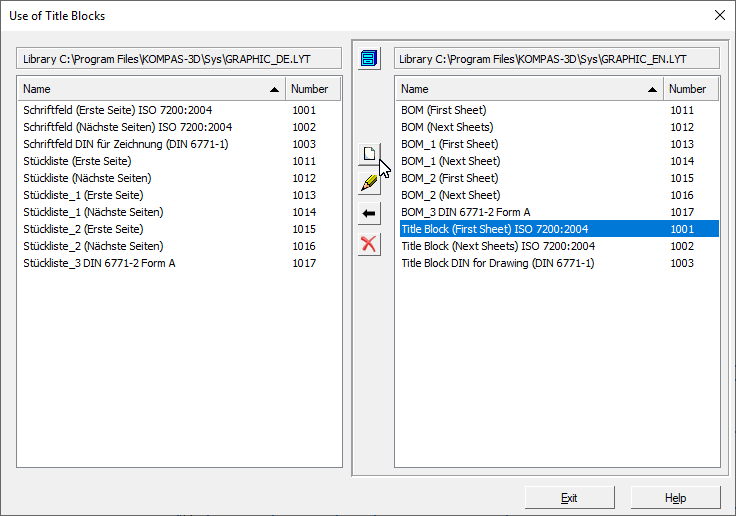
Choosing a prototype title block
The screen will ask you to confirm the use of the selected title block as a prototype. Click Yes in the request.
In this case, the Title block creation dialog It will contain a list of tables of the prototype title block, and you will be able to develop a new title block by editing these tables and their placement. It is also possible to delete tables and add new ones.
|
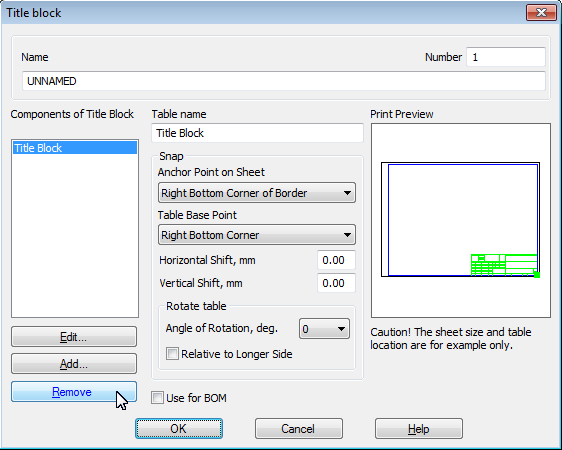
Editing the prototype title block
To edit a table highlighted in the list, click Edit..., and to delete — Delete button.
There is no difference between the title block created using the prototype, and the title block created without it.
Similarly, it is possible to create detailing based on the prototype.
