|
Title block dialog |
Scroll |
The dialog allows you to create a new or edit an existing title block (stamp) for paperwork. The stamp is created as a set of ordinary tables for which the rules of placement on the sheet are established.
Title block descriptions are stored in special system libraries – files with the *.lytextension.
The dialog appears on the screen after pressing the Create or Edit button. Working with title blocks dialog.

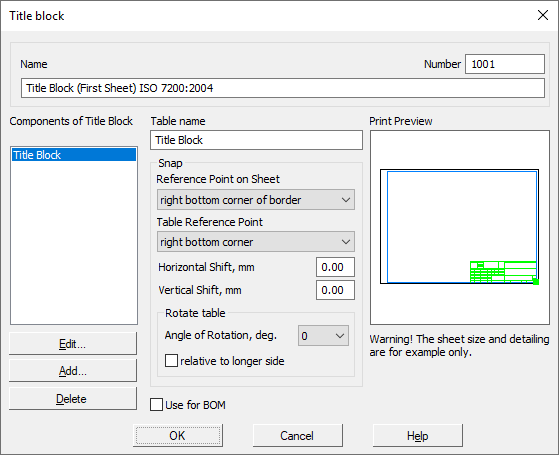
Description of Controls
Name |
Description |
|
Name |
The field to enter or edit the name of the title block. |
|
Number |
The field for entering or editing the title block number. |
|
Components of Title Block |
The field contains a list of the names of the tables that make up the title block. |
|
Table name |
The field for entering or editing the table, selected by the Components of title block. Changes made in this field are transferred to the list. |
|
Edit... |
The button allows you to make changes to the table of the main title, highlighted in the list Components of title block. Starts the mode of setting the table of the title block. |
|
Add... |
The button allows you to create a new table included in the title block. Opens the New Table dialog. |
|
Delete |
The button allows you to remove from the title block from the table highlighted in the list. |
|
Snap |
A group of elements allows you to configure the placement options on the sheet of the table highlighted in the list Components of title block. The elements of the group are described in detail in the table. Elements of the group Privyazka. |
|
Use for BOM |
The option allows the use of a table selected in the Title Block Composition list for placing the text of the BOM items (the table must contain cells with the style For BOM Table, see section). Configure Extended Cell Format). This option can be enabled for only one table in the title block. If this setting is not enabled for any table in the title block, the system won’t be able to display the text of the BOM items, and an error message will appear. |
|
Preview |
Field in which conditional (without respecting the size) shows a custom title block. Table highlighted in the list Components of title block highlighted in the box. If you change the placement parameters of this table, the image in the field changes. |
The element |
Description |
|
Table Reference On page |
The list allows you to specify which characteristic point of the inner border of the document will be used as a reference for binding the current table. This point is shown in the field Preview in the form of a small square. |
|
Table Reference In the |
The list is used to specify which characteristic point of the table will be combined with the reference point on the sheet. |
|
Offset horizontal, Offset vertical |
Fields to enter the offsets of the table’s reference point relative to the reference point on the sheet. |
|
Rotate table |
A group of elements allows you to set the value and direction of rotation of the table around its reference point. The rotation value is set by selecting the desired line from the list Rotation angle(the list contains angles which are multiples of 90°). The table is rotated relative to its reference point. If the location of the table depends on the format and orientation of the sheet, for example, the location of the additional column for placing the designation (column 26, see GOST 2.104-2006), enable the option Relative to the long side. |
You can complete the work in the dialog by clicking the OK. Click Cancel to discard all changes and close the dialog box.
