|
Create/edit text style dialog |
Scroll |
Allows you to create or edit the style of the text, which can later be used to quickly draw paragraphs. The style includes font options, paragraph formatting data, and other settings.
The dialog appears on the screen after pressing the Create or Edit button in In the dialog for using style library sets, as well as pressing the New... button in Text style selection dialog.

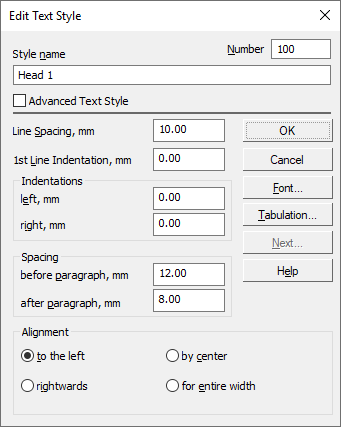
Description of Controls
The element |
Description |
|
Name |
Input field (edit) style name. It is recommended to give styles informative names that well reflect the purpose of styles. In the future, it will simplify the search for a style in the list. |
|
Number |
Input field (edit) style number. The number must be unique. The rules for style numbering are given in the Style number. |
|
Advanced Text Style |
The option allows you to set advanced text style options. After it is enabled, Next... button becomes available, which triggers a dialog. Advanced Text Style. |
|
Line Spacing |
A field to enter the distance between the lines of text. |
|
1st line indent |
The field for entering the indent value to the right of the paragraph border in its first line. |
|
Indentations |
Group of fields to set the distance between the left and right borders of the input field and the corresponding text borders. Note that because of the presence of gaps in the characters of the font, so that the letters do not “stick together” with each other, this distance in the text may slightly differ from the specified in the dialog. |
|
Spacing |
Fields group to set distances between two neighboring paragraphs. The distance value is a sum of two quantities – spacing after paragraph of the previous paragraph and the spacing before the subsequent paragraph. |
|
Alignment |
The group of toggle switches allows to select method of the paragraph alignment (by the left-hand boundary, by the right-hand boundary, by center, alignment by two borders). |
|
Font... |
The button allows you to adjust the font parameters. Opens the Font Parameters. |
|
Tabulation... |
The button allows you to adjust the table parameters. Opens the Tabulation. |
|
Next... |
The button allows you to adjust the number and step of lines, as well as the height and width of characters. Opens the Advanced Text Style. The button is available when the option is on Advanced Text Style. |
To finish creating/editing the text style, click OK. Click Cancel to discard all changes and close the dialog box.
