|
Tab settings dialog |
Scroll |
The dialog allows you to assign tab step parameters.
The dialog appears on the screen after pressing the button Tabulation... in dialog for creating/editing text style or by the link Set in Paragraph Parameters Setup Dialog.

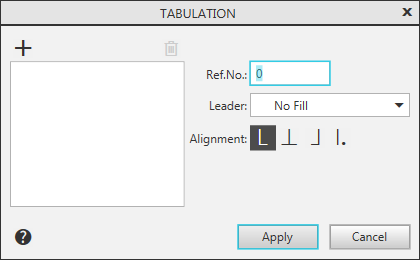
Description of Controls
The element |
Description |
|
Ref.No. |
Field to set the tab indent position in millimeters. |
|
Filling |
The list allows you to choose how to fill indent tabs. |
|
Alignment |
A group of buttons allows you to select how to align the text relative to the tab. For description of the methods, see table The ways to align the text relative to the tab. Text alignment using tabs can be used, for example, when creating tables of contents. |
|
|
Add |
The button allows you to add custom tabs to the list. |
|
Delete |
The button allows you to delete the tab selected in the list. |
Tab list |
The list contains all created tabs. The list is sorted by the value specified in the field Position, – from the smallest value to the largest. When entering text in a document, tabs are applied in the order in which they appear in the list. You can change the way text is aligned and/or fill in the tab indent selected in the list. For that, assign needed values and press the Addbutton. Indent size cannot be changed in this way. After entering a new value in the field Position and pressing a button Add a new tab is created in the list. |


The ways to align the text relative to the tab
Method |
Description |
Example |
|
|
To the left |
The part of the line entered after the tab is located to the right of its position. Several lines starting with this tab are left justified. |
Multi-column layout. Each paragraph consists of one line and contains tabs, the number of which is equal to the number of columns. |
|
By Center |
The part of the line entered after tabulation is located symmetrically relative to its position. |
Headlines. Tabulation is inserted on each line before the title text. |
|
To the right |
The part of the line entered after the tab is located to the left of its position, i.e. this part of the line ends at the tab stop. Several lines containing such a tab are right aligned. |
Tables of Contents. Between the text of the title and the page number is inserted the right tabulation with a filling. |
|
By decimal separator |
The tab position is the point entered anywhere in the line after the tab. |
Multi-level lists, nested table of contents. |


To complete the tab settings, click the Apply button. To exit the dialog without saving changes made, press the Undo button.
