|
Paragraph Parameters Setup Dialog |
Scroll |
This dialog appears on the screen after calling the Paragraph Properties... command from the menu Format or from the context menu.

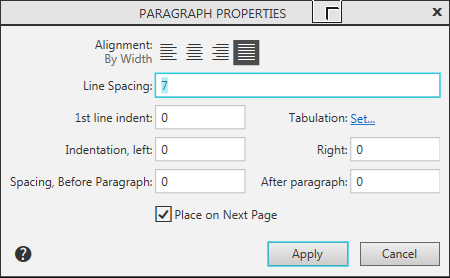
The dialog allows you to assign different parameters for selected or recalled paragraphs of text. Parameter values are set in millimeters.
Description of Controls
The element |
Description |
|
Alignment |
A group of buttons for selecting paragraph alignment. |
|
|
By left edge |
All paragraph lines begin strictly at the left border of the text. The line ends are not aligned. |
|
The position of the beginning of the first line of the paragraph is set by the value of the red line (see the Figure). |
|
|
Centered |
The text of the paragraph is arranged symmetrically relative to the margins of the text. This alignment method is usually applied to headers. |
|
By right edge |
All paragraph lines end strictly at the right margin of the text. The line starts are not aligned. |
|
By Width |
The lines of the paragraph begin at the left margin of the text, and end at the right margin. Stretching of lines occurs due to automatic increase in the width of spaces. This alignment method is most often applied to the main text of the document. |
Line Spacing |
Sets the distance between lines of text. |
|
1st line indent |
Sets the indent value of the first paragraph line. If the paragraph alignment is set to the right or center, the indent value of the red line will be ignored when formatting this paragraph. |
|
Indentation |
||
Left-side view |
Sets the indent to the left. |
|
Right-side view |
Sets the indent to the right. |
|
Spacing |
||
before paragraph, mm |
Sets the spacing before the paragraph. |
|
After paragraph |
Sets the spacing after the paragraph. |
|
Tabulation |
It configures tabulation settings in paragraph. After clicking this button on the link Set, the screen will display Tab settings dialog. |


On completion of the paragraph properties set-up, press the Applybutton. To exit the dialog without saving changes made, press the Cancel button.
