|
Change of paragraph properties |
Scroll |
A sensible setup of paragraph properties allows to impart to a text document more expressiveness and make it more amenable for perception.
To set up the paragraph properties, the Paragraph properties... command is used.

On fetching the command from the menu (context menu), a dialog allowing to set the parameters of the current paragraph is displayed on the screen.
For a description of controls in the Paragraph Parameters Setup Dialog...
On setting up the paragraph properties on the Parameters toolbar in the Paragraph sector:
•assign a method of paragraph alignment (left-aligned, by center, right-aligned, by width) in the group of the Alignment group of elements,
•set a line spacing in the Line Spacing field,
•set the value of indentation from the border of the paragraph in its first line in the 1st line indent field,
•set the tabulation parameters by fetching the respective dialog,
•set indentations from the left and right in the Indentation field,
•set the interval value before the paragraph and after the paragraph in the respective fields.
After setting the paragraph properties, the current paragraph and the paragraphs entered after it will be laid out and aligned according to the setting made.
If prior to fetching the command there were selected text paragraphs, the action of formatting settings applies to these paragraphs only.
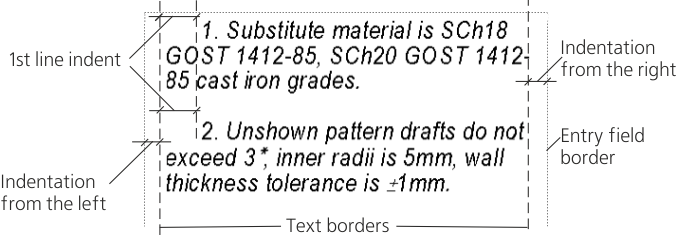
Text detailing on page
|
To transfer the text located after the cursor to the start of a new page (i.e. to insert a page break into the cursor position), press the keyboard shortcut <Ctrl> + <Enter>. |

