|
Advanced text style settings dialog |
Scroll |
This dialog allows to configure the advanced text style.
Appears on the screen after pressing the Next... button in text style create/edit dialog The button is available when the Advanced Text Style option is enabled.

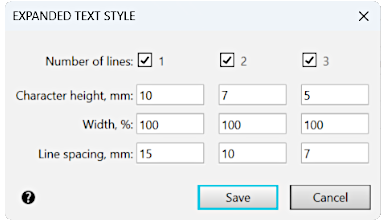
Description of Controls
Name |
Description |
|
Number of rows |
Turn on the options you need to customize the settings for text consisting of the appropriate number of rows. After enabling the options, parameter input fields become available. |
|
Symbol height |
Fields for entering character heights in millimeters. |
|
Character width |
Fields for entering characters in percent. |
|
Line Spacing |
Fields to enter the distance between the lines of text. |
More about the advanced text style...
To finish editing the advanced style, click Save. To exit the dialog without saving changes made, click Cancel.
