|
Split Cells dialog |
Scroll |
Allows to split table cells. Appears on the screen after clicking Split cells  button.

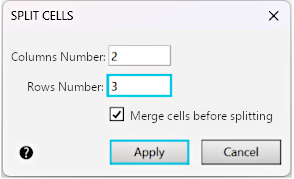
The dialog controls allow to set the Splitting source cell or block of selected cells.
Description of Controls
The element |
Description |
|
Number of Columns |
The field allows you to enter or set using the counter the number of columns into which the cell will be divided. |
|
Number of Rows |
The field allows you to enter or set using the counter the number of rows into which the cell will be divided. |
|
Merge cells before splitting |
The option allows you to manage the state of selected cells before splitting them. |
To complete the setting of parameters, click Apply. The Cancel button allows you to close the dialog and discard the changes.
