|
Terms and definitions |
Scroll |
A B C D E F G H I J K L M N O P Q R S T U V W X Y Z
|
Absolute coordinate system — a coordinate system automatically created in graphic documents and model documents. The absolute coordinate system of a document cannot be edited or deleted. |
||||
|
Active view (layer) - a view (layer) whose objects are available for editing and deleting operations. All objects belonging to the active view (layer) are displayed in the graphic area with the specified style (for example, lines retain their thickness, and points retain their shape), but in the same color set for that view (layer) in the Document Tree. At this moment, several views (layers) of a document can be active.
|
||||
|
Additional BOM sections are located at the end of the BOM, after all its sections. Usually, additional sections are located starting with a new sheet. Groups of additional sections are called blocks of additional sections. For details on section blocks... |
||||
|
Add-On — application, created to extend standard capabilities of KOMPAS-3D and operating in its environment. A typical example of the Add-On is a library of standard mechanical-engineering elements that substantially boosts designing of assembly drawings. The add-on library can be created in one of the standard coding environments for Windows (Borland C ++, Microsoft Visual C ++, Borland Pascal, etc.) using the functions of a special applications development kit — KOMPAS-MASTER. The library is a dynamic link library (DLL). By default, library files have the DLL or RTW extensions. KOMPAS-3D supports simultaneous work with multiple connected libraries. Modes of running with a library can be different (a window, dialog, a menu). After linking a library to the system, the user selects the required function from its directory and launches its execution. |
||||
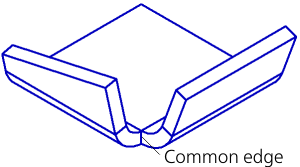
Adjacent bends Bends are adjacent if they have a common edge located in a way as shown in Fig. 1.
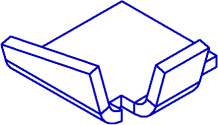
Fig. 1 Bends having relief cuts and displaced relative to one another are not adjacent. Their respective angles cannot be closed (fig. 2).
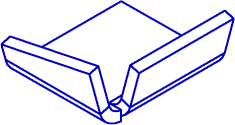
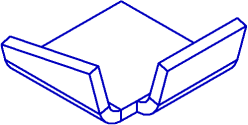
Fig. 2 The planar sections of a part modified on capping the corner are called the sizes of a corner being capped. |
||||
|
Advanced text style — additional data stored in the text style, which defines the relationship between the number of lines of text — one, two, or three — and its parameters — symbol height and width, and line spacing. |
||||
Angle release Angle release on designing a bend — partial removal of the neighboring bend, or the neighboring bend and its extension, or the neighboring bend, its continuation, and all the bends designed at this continuation. Removal of specified elements is performed the direction of the created bend from the plane, perpendicular to the line of the neighboring bend and running through the intersection point of the mating lines of the cylindrical surfaces of bends. |
||||
|
Assembly — a kind of three-dimensional model intended for representation of products manufactured using assembly operations. It is created and stored in the "Assembly" document with the file extension a3d. |
||||
|
Associative hatching (fill) — hatching (fill) with boundaries that coincide with specific linear objects (or their parts). On change of position of these objects, the border of hatch (solid fill) automatically moves together with them. |
||||
|
Associative report — a report associatively linked to the document from which it was generated. On change of objects or their properties, as well as the structure of the source document, data in all the related reports changes either. An associative report is located in a graphic document. |
||||
|
Associative view — a view of a drawing associatively linked to an existing model (a part or an assembly). On change of the shape and the dimensions of a model, the image in all the views related to it also changes. |
||||
Associativity (associative link) Associativity (associative link) — a unidirectional dependence of location or geometry of one object on the position or geometry of another object. |
||||
|
Attachment point — a special object that allows setting the spatial position of the connected (joined) pipeline elements and the direction of the attached element. The properties of an attachment point are its position in a model, the axis which sets the direction of attachment at this point, and an additional axis. A pipeline element may contain several attachment points. To link two pipeline elements, it is necessary to align their attachment points and axes (or to set angles among the axes). |
||||
|
Attribute — additional non-graphical data related to an object (or multiple objects) in a document. Such information can be represented as a number, a row of text, as well as a table with a fixed or variable number of rows. Types (structure descriptions) of attributes can be stored both directly in the document and in special files (attribute type libraries). These files have the extension lat. Further, values of attributes can be processed by various applications (for example, the Module of designing BOMs, various calculation programs, etc.). In drawings and fragments, you can also search by attribute values (to do this, use the Select by propertiescommand). |
||||
|
Background view (layer) — a view (layer), the objects of which are available only for performing snapping operations to points or elements. These views (layers) cannot be moved, and their contents are unavailable to editing. All the objects of background views (layers) are represented in the graphic region in an identical line style which can be configured. The styles selected for objects on their creation are ignored. A view (layer) is normally made background if its formation is complete, and it is needed only as a "substrate" for placement of other objects. At present, several views (layers) of the document can be background at this moment.
|
||||
|
Base face of bend — a flat face of the sheetmetal part containing the bend line. |
||||
|
Base point of a three-dimensional object is a point used as the starting point for constructing the object's geometry in the model. The position of the base point of an object is determined automatically and depends on the object type and design method. For example, a base point of a component is its absolute coordinate system, a base point of operation based on the sketch is the center of gravity of curves of this sketch. |
||||
|
Bend — a non-flat section of a sheet solid. Bends can be cylindrical, conical, and lined. Cylindrical bends are formed into parts on running the following commands: •Bend, •Incision, •Sheet Solid (based on an open sketch). While running the Shell Ring and Ruled Shell Ring command, both cylindrical and conical bends may be formed, as well as bends based on a ruled surface. More details about shell rings... |
||||
|
Bend amount — an explicitly specified value of the unfolded length of the cylindrical part of the bend. Details about determination of the flat pattern length by specifying the Bend amount... |
||||
|
Bend extension — a part of the sheet element, adjoined to the bend opposite to the edge along which this bend is located. |
||||
|
Bend flat pattern — bend parameter, defining the length of its unfolding. Depending on the selected flat pattern length determination method, such a parameter is the coefficient of neutral layer, either a bend amount, or bend reduction. |
||||
Bend line Bend line — a straight line object that defines the position of a bend in a sheet body. |
||||
Bend offset Bend offset — is a parameter characterizing the shift of the bend in the plane of the base face. Bend offset is done perpendicular to edge along which it is located. |
||||
|
Reduction of the bend — parameter BD in the formula for determining the length of the cylindrical part of the bend: l = 2•a — BD. More details on Determination of the Flat Pattern Length by Specifying Bend Reduction... |
||||
Bend release Bend release — slots in the sheet body, located on the sides of the bend. |
||||
Bend table Bend table — table that contains values of bend allowance parameters, corresponding to different material thicknesses, bend angles, and bend radii. |
||||
|
In KOMPAS-3D, a Bezier curve is understood as a curve consisting of smoothly joined segments, each described by fourth-order polynomials, with each segment constructed through four control points. The extreme ones of these four points are set by the user, and the middle ones are calculated, proceeding from the condition of continuity of a derivative curve, and lie on the derivative vector. The user can edit the position of any reference point. |
||||
|
The BOM Design Module KOMPAS-3D allows you to create BOM documents (standard file extension spw). |
||||
|
BOM description — a set of parameters required for displaying the BOM data in the document on the screen. The BOM description includes a path to the BOM style library and the specific style from it, as well as the setting for the display of mass values (measurement unit and precision). The BOM description is stored in the document. One document can have several descriptions. One of them is the current description. |
||||
|
BOM item — a row or several consecutive BOM rows that are related to the same material object. For base items, there is support for automatic filling of columns, sorting within sections, connecting graphical documents (for example, working drawings of parts), entering additional parameters, and so on. Unlike the base object, for the auxiliary object no service functions are provided, whose running is ensured by the BOM. It is used, for example, for input of any texts (comments) into a row of BOM, or for creation of an empty row in the midpoint of the section. |
||||
|
BOM style — a set of parameters and settings inherent to the BOM, influencing its filling and display. Components of the BOM style are described in section Components of style. |
||||
|
BOM subsection — a group of items within the BOM section. More details on the subsections... |
||||
|
CALS (Continuous Acquisition and Life cycle Support) is a concept and ideology of information support for the product life cycle at all its stages, based on the use of a single information space (integrated information environment), which ensures uniform ways of interaction for all participants of this cycle: product customers (including government institutions and agencies), suppliers (manufacturers) of the product, operational and maintenance personnel, implemented in the form of international standards that regulate the rules of the mentioned interaction mainly through electronic data exchange. |
||||
|
Center mark — a graphical object intended for labeling the centerlines of axisymmetric objects: circles, arcs of circles, ellipses, arcs of ellipses, rectangles, and polygons. Line style for the center mark — centerline. |
||||
|
Centerline — a graphical object intended for placing axial lines. A specialty of the centerline is that it does not end at its defining points, and protrudes outside them at a certain distance. |
||||
|
Central coordinate system — a coordinate system whose origin coincides with the center of gravity of model and whose axes are parallel to the axes of the absolute coordinate system. |
||||
Characteristic Point Characteristic Point — an interface element that appears in the graphic area when creating or editing an object, intended for managing its position or geometry. |
||||
Closable angle Closable angle is measured in a projection of part onto a plane perpendicular to the angle sides. A plane like that may be any plane perpendicular to the line of intersection of external or internal faces of the angle sides. |
||||
|
Coefficient of neutral layer (coefficient of the position of a neutral layer) determines the position of the neutral layer by the thickness of a solid being bent. It is used for determination of lengths of the expanded sections (on unfolding of bends). The length of a neutral layer in a bend does not change on its unfolding. On increase of the coefficient, the neutral layer is displaced to the external surface of bend, and the length of the unfolded section increases. On decrease of the coefficient, reverse changes occur. The value of coefficient of the neutral layer depends on the physical characteristics of material, its thickness, and radius of a bend. Details... |
||||
|
Connected set of faces — a collection of faces, each of which has a common edge with at least one other face of this collection, and one edge at the same time belongs to no more than two faces. |
||||
|
Collection — a set of model objects necessary to perform certain constructions. Collections are used for selection of objects during creation of copies of geometrical objects. |
||||
|
Component — an object of a model represented by another model. Parts, assemblies, stock parts, local parts and local stock parts; and in assemblies — standard items and library elements can be components in a model. A component model can be stored in a separate file or in the current model file. The following components are stored in separate files: •parts, •assemblies, •stock parts, •stock products, •models from library. In this case the current model actually contains not components, but references to their files. The following components are stored in the file of the current model: •local parts, •local stock parts. These components have no independent file representation. They are stored directly in the model that contains them. |
||||
Component load modes Modes of component loading — methods of loading a component differing in data volume, placed into the computer memory. The following modes of loading of a component are available: •fully loaded — the component is loaded entirely; it is visible in the Design Tree and in the graphic area, •simplified — component is loaded such that it is visible in the Tree and in the graphic area of the model, but in the graphic area, it is displayed without wireframe lines and with reduced accuracy (i.e., less "smooth"). •bounding box — the component is loaded so that it is visible in the Design Tree and in the graphics area, but only its bounding box is displayed in the graphics area. •empty — the component is not loaded; it is seen only in the Assembly build tree. Use of the simplified, dimensional (size) and empty modes of loading allows to boost processing (rearrangement, drawing after rotation or shift, etc.) the models of large assemblies. For instance, you can enable full loading only of the subassembly with which work is run at the given moment, and the remaining components should be detached — if it is required to see their position in an assembly — to display a size or to load it in a simplified way. |
||||
|
Conditional object — a copy of the mathematical representation of the object (faces, edges, vertices), repeating the position of the component object or mockup component. A conditional object is created on replacement of a component with the detailing if the component object participates in mating or is used in the assembly operation as well as on reverse replacement — a detailing with a component if in the mating or operation a detailing object is used. A conditional object repeats the position of the source object at the moment of creation of mating or running an operation. It is created in an assembly and is stored in it. |
||||
|
Print device configuration — a file with the pdcextension, into which the current printing options (the size and the method of paper feed, page orientation), and data on the print device. The configuration file has a text format, therefore it can be opened and edited with any text editor, for example, Notepad, which is part of Windows. |
||||
|
Connected set of curves (curve series) — a collection of curves, each of which has a common vertex with at least one other curve of this collection, and no single vertex belongs to more than two curves at the same time. |
||||
Context bar Context bar — a toolbar panel displayed on the screen near the cursor after mouse click (in a text document — also after selection of text fragment), containing buttons to fetch most frequently used commands. |
||||
|
Context menu — a menu invoked by right-clicking the mouse, containing a set of commands that can be applied to an object or to the entire document. |
||||
|
Contour — a composite object representing a chain of curves and constructed based on initial objects. In a particular case, the contour can be represented by one curve. |
||||
|
Control point — a special object of a model that allows setting the spatial position of a pipeline element on its path. The property of a control point is its position in a model. A pipeline element may contain several control points. One of them shall be located at a set point of trajectory. |
||||
|
Copy of geometric objects — a model object containing geometric objects with no history, which are copies of the geometric objects of this or another model. The copy may include objects of the model itself, its components and the detailing geometry contained in it. |
||||
|
Current BOM style — the BOM style included in the current BOM description. Assignment to the BOM description the "current" attribute is performed in the dialog for control of BOM descriptions. |
||||
|
Current view (layer) — a view (layer) into which newly created objects are placed. In the drawing, new objects are located on the current layer of the current view, and in the fragment or model — on the current layer. Only one view of the drawing and only one layer of a view (a fragment, model) can be currentat the given moment. In the current layer, you can perform any operations on entering, editing and deleting objects. Any view (layer) can be made current. At the same time, it automatically becomes visible, and in the graphic document active as well. As long as a view (layer) is current, these parameters cannot be changed (i.e. the current view (layer) can be neither made hidden nor background). Once the current status has been assigned to another view, the state of the view (layer) which was formerly current is restored. For example, at some point of working with the drawing, View 1 was current. View 2 at that time was background and visible. Then View 2 was made current, therefore it became active. At the end of editing View 2, View 1 was again made current. At the same time, View 2 again became background. |
||||
|
Cursor Pitch — the distance that the cursor moves when you press an arrow key once. The user can set any step of the cursor. |
||||
|
User-defined toolbar set — a set of toolbars created by the user during the interface customization process. Custom sets support the same operations as with systemones. In addition, for custom sets, the operations of renaming and changing the icon, adding to documents of various types, and deleting are available. |
||||
|
custom toolbar — a toolbar created by the user during the interface customization process. Custom toolbars support the same actions as with system toolbars. The name of the custom toolbar can be changed. |
||||
|
Data processing window — a mode of running the Create Reportcommand which is used for viewing and editing data placed into a report and advanced settings of the report. From the data processing window, the configured report can be placed into a document, printed out, or saved into a separate file. |
||||
|
Design tree of a model — a structured list ('tree') that reflects the composition, building sequence of the model, states of the model objects, and their associations. |
||||
|
In the drawing-graphic editor of the KOMPAS-3D system, when working with documents (graphic and text), the concept of formatting is used. The sheet detailing includes the title block, as well as the external and internal borders. Detailing of sheet of a text document, apart from the title block and marquees, includes information on text indentations from the internal marquee. Sheet ldetailings of graphic and text documents are stored in special system libraries — files with the lyt extension. The user can edit existing ones and create own layouts. |
||||
Dimension variable Dimension variable — a variable created by the user during the process of creating a dimension in a graphic document or sketch. The value of is the value of the respective dimension. If a dimension for which the variable was created is fixed, this variable can be used to control the value of the dimension. If a dimension is of info purpose, then it is impossible to control its value through a variable. |
||||
|
Dimensional parallelepiped — a conventional parallelepiped, whose faces are parallel to the coordinate planes and run through the most distant points of model objects. The user can select object types, which will be accounted for when building a bounding box. |
||||
Direction of bend Direction of bend — direction of a bend relative to the base face. The direction towards the base face — direct; the opposite direction — reverse. |
||||
|
Document property — the characteristic of a document and the objects included into it. The list of document properties is created in a drawing, a fragment, or a model document. This is a unified list for the document and the objects it comprises, whereas values of the objects' properties can differ. Properties can be set: •in graphic documents — to an entire drawing or fragment, to macro-elements or insertions of views and fragments; •in the model document — to a model in general, to components and solids. In the associative view of a drawing, properties of model based on which the drawing was created can be taken into account.
Document properties are subdivided into system and advanced. System properties — properties which are always present in the document and available for use in it, for example, designation, name, mass, etc. The values of some system properties are determined automatically, and the values of other properties are set by the user. Advanced property — a property inherited from an external property library. Advanced properties are set to the document by the user. Values of additional properties are also specified by the user. |
||||
|
KOMPAS document template — a blank document containing the detailing, settings, objects, layers, etc. Document templates supplied with KOMPAS-3D are stored in the \Templates subfolder of the main KOMPAS-3D folder. It is also possible to create custom document templates. |
||||
|
Document tree — a structured list ('tree') of objects that reflects the sequence of the document's creation and its composition. Displaying of the "+" icon near the object means that it has objects subordinated thereto. To expand their list, click the icon. Context menus of objects on the Tree facilitate access to commands which are most frequently used while working with objects of this type. |
||||
|
Drawing — the primary graphic document of the KOMPAS-3D system. The drawing is stored in at file of special binary format (filename extension — cdw). Each drawing may consist of one or several sheets, views, layers. Detailing elements of a sheet — a marquee and the title block. Detailing elements of a drawing — technical specifications and surface finish designation of unspecified part surfaces (an unspecified surface finish mark). |
||||
|
Drawing Tree — a structured list ("tree") reflecting the drawing views and their structure (macro-elements, view insertions and fragments, for associative views — model objects). |
||||
|
Drawing view — a part of the KOMPAS-3D drawing is a "container" for drawing objects, as well as the objects which are inside this "container". Objects contained in one view can generate both one image (a view, a cut, a section, or a leader element) and several at a time. In in essence, a drawing may consist of the only view which will contain all the required images. However, it is strongly recommended to split all graphic information in the drawing into views, placing each image into a separate view. The main characteristics of a view are the scale and position. The scale can be selected from a standard range or set as a ratio of arbitrary numbers. The position of the view is determined by the coordinates of its base point in the absolute coordinate system and the angle of rotation. In each view, it is possible to create up to 2 147 483 647 layers for convenient placement and processing of image. |
||||
|
DWG is a proprietary binary format owned by Autodesk Inc (USA). |
||||
|
DXF (Data eXchange Format) — a special symbolic exchange format developed by Autodesk Inc. (USA) for its software products, primarily AutoCAD. This exchange format has become the de facto standard for drafting and graphic systems and is supported by practically all CAD software developers. |
||||
Dynamic search Dynamic search — automatic recognition of objects which are currently under the graphic cursor. Rules of automatic recognition depend on the filters (in models) and the current process. |
||||
|
EMF (Enhanced Metafile Format) — a 32-bit graphical format based on the 16-bit WMF (Windows Metafile Format), but containing various enhancements. Developed by Microsoft and is used for exchange of graphic information among Microsoft Windows applications. Supports vector and bitmap graphics. |
||||
|
Empty row — a BOM sheet row located directly above or below the header of a section. It separates the section header from BOM items. You can't enter text into an empty row. This row is included in the BOM due to the requirements of the standard. |
||||
|
Entry — text in the BOM column, consisting of several fields. |
||||
External variable of a fragment External variable of a fragment — a variable in a parametric fragment, the value of which can be changed when this fragment is inserted into another fragment or drawing (as a solid or an external reference). The main purpose of external variables — control of parameters of the parametrical fragment inserted into another document without editing this fragment "outwards". A sign of an external variable is the If an external variable of a fragment also has the "Info" status, then on insertion of a fragment into another document, it is visible, but is unavailable for editing. Generation of variables and assignment of the "external" and "info" statuses to them is performed on creation of a fragment. Only the user defined variable, i.e. a variable of the main section can be external. |
||||
|
External variable of a model — a variable in the model whose value is accessible and can be modified in another model that contains it as a component. The main purpose of external variables — to control the shape and dimensions of a model during and after its insertion into another model. Generation of variables and assignment of the "external" and "info" statuses to them is performed during creation of a model. Only the user defined variable, i.e. a variable of the main section can be external. A sign of an external variable is the The external information variable is visible, but it is not available for editing in a model containing a component. |
||||
|
Face — a primitive which represents itself a part of the surface limited by the edges, which does not contain other edges inside. A special case of a face — a closed face with no borders (for example, spherical and toroidal). |
||||
|
Face pole — an edge of the face, representing a point. |
||||
|
Designations of stock products (for example, screws, washers, unions, etc.) and materials (for example, channel bars, paper, paronite, etc.) follow the rules set by GOST for these products and materials. According to these standard rules, for each type of objects (washers, channel bars, etc.) in KOMPAS-3D, fill templates have been pre-configured — a kind of "blank forms" with fields for the object properties input. The template also stores Information on by which fields and in what order to sort objects of this type. When entering stock products and materials into the BOM, not all fields of a template can be filled (for example, the screw has no coating). In the graph of Name BOM, a line which is automatically generated from the filled fields of the designation of selected object enacted by the standard is placed. |
||||
Fixed side Fixed side — a portion of the base face the position of which will not change when you create a bend. Just in this part of a base face, the phantom arrow showing the direction of counting the bend angle starts. The position of arrow changes with change of the fixed side. |
||||
|
Flat portion of the Incision — a part of the sheet solid, located between the bends of the notch. |
||||
|
Fragment\u2014KOMPAS-3D document (file extension\u00a0\u2014 frw). It is different from a drawing by a lack of detailing elements. In a fragment there is no marquee, the title block, the unspecified surface finish mark and technical specifications. A fragment just as a drawing view can contain up to 2,147,483,647 layers. A fragment is usually used for storage of images which do not need to be processes as a drawing sheet (rough drawings, developments, etc.). Besides, in fragments it is convenient to save created standard solutions and structures for subsequent use in other documents. We note that KOMPAS-3D provides the ability to reference a fragment file without physically copying it into the document. Furthermore, after editing the fragment, the document containing the insertion will be automatically corrected. |
||||
Gap Gap — distance at which the sides of the closing angle will be positioned relative to each other. A gap is measured in a projection of part onto a plane perpendicular to the sides of the angle. A plane like that may be any plane perpendicular to the line of intersection of external or internal faces of the angle sides. |
||||
|
Geometrical array — an array of operations, on whose creation only faces and edges of objects being copied are replicated. |
||||
|
Geometry calculator — mechanism for obtaining numerical information about the parameters and relative positions of objects for the purpose of using it in constructing other objects. |
||||
|
Grid — periodically arranged points (or lines) in the graphical area and serves for the convenience of constructions. The grid is an accessory of the KOMPAS-3D window. The user can enable or disable at any time the display of grid in the window and configure its settings (color, typeface, and spacing). The image of grid is never printed out. |
||||
|
Group — a named set of objects of a graphic document. The same object may be part different groups. |
||||
|
Hidden view (layer) — a view (layer) whose contents are not displayed in the graphical area regardless of whether it is active or background. Therefore, the hidden view (layer) is completely unavailable for any operations.
|
||||
Hierarchy of protected load modes If at the moment of creation of a new protected assembly loading type (or at the moment of password protection of the user type of loading), other protected load mode was then current, then the created (or protected) type of loading becomes subordinated in relation to the current, but it in turn becomes initial relative to the created (or protected). Removal of the subordinate type of assembly loading or its password is accessible only if the current mode of loading is initial. |
||||
Home page Home page — a service element providing the user with the following features: •opening recently closed documents, •creation of a new document, •a tip on effective work tricks, •a link to the help and Internet resources. |
||||
|
IFC (Industry Foundation Classes) — an open format for data exchange among various software products. The format has been developed by buildingSMART (International Alliance for Interoperability, IAI). The format is used to reproduce a model created in one system in another system. The geometry of objects is transferred without the options of editing, properties and attributes. |
||||
|
IGES (Initial Graphics Exchange Specification) — basic specification for graphic information exchange. This format is designed for information exchange among the CAD systems and other vector applications. It is developed and is maintained by IGES/PDES organization accredited at ANSI. This interchange format is a de-facto standard for CAD systems and is supported practically by all the developers of such software products. The main application area of this format — transfer of information about three-dimensional geometrical models. |
||||
|
Info variable — a variable whose value depends on other variables, dimensions, position of document objects. A characteristic of an informational variable is the icon Info variables can be used in expressions. |
||||
|
Internal BOM item in an assembly — an item which does not get transferred to another assembly when the current assembly is inserted into it as a subassembly. On insertion of components (parts and subassemblies) into an assembly, there occurs an automatic generation of its internal BOM items which belong to the components. The user can complement the set of internal BOM items by creating new objects not related to external files, as well as edit the internal objects which are automatically created by the system. Internal BOM items from assembly are transferred into a drawing (during creation of associative views of this assembly) and into the BOM (on attaching an assembly document to it). |
||||
Lattice transparency Lattice transparency — a method of displaying a transparent object, in which the area occupied by this object is filled with individual pixels. The color of pixels matches the color of object at zero transparency. Pixels are located on the screen thus forming a regular structure — a grid. "Grid cells", i.e. sections where pixels of a transparent object are absent, are the larger the greater is the value of the "Transparency" parameter this object has. |
||||
|
Layer — a logic group of objects of a document. Layers are used to control visibility of objects; in graphic documents — also to control the option of editing and printing of objects. The maximum number of layers in a document is 2,147,483,647. Each layer may have a unique name to facilitate search. One layer of the document is a current layer on which new objects are automatically placed. Transfer of objects among layers is possible. |
||||
|
Layer filter — a dynamic group of layers whose properties conform to the filtering criteria. Details... |
||||
Layer group Layer group — a static set of layers, combined by some feature. It is intended for simultaneous equal change of properties of layers. More about the layer property group... |
||||
Layer property group Layer property group — a set of options for several layers. It is intended for simultaneous change of properties of layers according to the individual settings for each layer. For more details on the layer group... |
||||
|
Detailing geometry — part of a model, which is a set of objects that define the basic geometric parameters of a model (for example, mounting points, assembly space areas, the components that constrain it, etc.). Components of detailing geometry can be parts, assemblies, and local parts. |
||||
|
Mode of loading assembly — a combination of modes of loading components of an assembly. In any assembly, available are system modes of loading — Full, Simplified, Dimensional, Empty. In application of any system mode of loading to assembly, all its components get the respective type of loading. If necessary, you may create a custom load type in the assembly — a combination of full, simplified, bounding box, and empty load types for different components; moreover, the custom load type retains information about whether components are locked from editing. The load mode for an assembly may be password-protected. Details... |
||||
|
Local coordinate system — is a coordinate system that is arbitrarily positioned and oriented relative to the absolute coordinate system. |
||||
|
Local fragment — a fragment created and stored within another — main — document. The master document may contain an arbitrary number of insertions of a local fragment with various scales and angles of rotation. The changes made to a local fragment are immediately reflected in all of its insertions. It is convenient to apply local fragments, if the image stored in a fragment needs to be used only in one master document. |
||||
|
Local part — a component of the model, stored inside this model. A part or an assembly from a file can be inserted as a local part. Besides, a local part can be created while working with a model. |
||||
|
Lock object editing — an object attribute showing if any constraints are imposed upon editing of the object. Application/release of a lock to object editing is performed using the commands Editing — Forbidden or Editing — Enabled in the context menu. While working with an object available for editing, it can be changed by any available method. Such an object is not marked with any special icon in the Model Design Tree. While working with an object having a prohibition for editing, various constraints are active, among which are the impossibility of editing and impossibility of deletion out of a model. Objects with a prohibition of editing are marked in the Model Design Tree with a "shield" icon. While working with an assembly, information on prohibition of editing components is written into the assembly load mode and can be protected by a password. |
||||
|
Macro-element — a composite object perceived by the system as a single entity. |
||||
|
Main axis of inertia coincides with the respective axis of the main central coordinate system. |
||||
Main central coordinate system Main central coordinate system — a coordinate system whose origin matches the center of gravity of a model and in which centrifugal inertia moments are equal to zero. |
||||
Main section of the list of variables Main section of the list of variables — a group of document variables created by the user. These variables are in the upper part of the Variables toolbar, at the first level of the list. You can create a variable of the main section directly in it (Details...). If during entering an expression, which contains variables missing in the document, these variables are automatically created in the main section. |
||||
Mate of mechanical link Mate of mechanical link — a mate that defines the law of movement of one model object relative to another one on movement of any of them. Mates of mechanical link are used, as a rule, for modelling the operation of mechanisms. |
||||
|
Mating — an association between a component and another object of the model, defining their mutual spatial arrangement. |
||||
|
Message area — an area located in the lower part of the Parameters display which contains system messages relating to running of a current command or to the element of the graphic region of the document to which to cursor indicates. |
||||
|
In KOMPAS-3D, a metaspline is understood to be a smooth curve with a high order of continuity, constructed based on a characteristic polyline. |
||||
|
Mockup — a model (part or assembly) intended for the geometric representation of any component in the assembly. Mockups are used for replacement of "heavy" component subassemblies inside a large assembly for increasing the speed of working with it. A mockup contains the minimum number of geometric objects, sufficient to form the appearance of the assembly, position its components, and create associative views. When replacing a component with a detailing, only the geometry (geometrical objects, Detailing elements, components) is transferred to the assembly from a detailing file. Properties (mass-inertia properties, the name, designation, etc.) are taken from a component file. |
||||
|
Mockup component — model component obtained as a result of replacing a component by a mockup. The mockup component has a geometry (geometrical objects, detailing elements, components) that is passed from the detailing file, and the properties (mass-inertia properties, the name, designation, etc.) transferred from the file of the source component. |
||||
Model element Model element — an object, the creation of which in the model leads to the addition or removal of material of solids. There are morphogenetic and additional elements. |
||||
|
Model version — one of the model variants, information on which is contained in one group document. The system supports creating dependent and independent versions. Dependent version has a link to the initial version, and independent version has no such link. A set of model versions is graphically represented in a document in the form of a Versions tree. It is displayed on the Versions tab of the Model Tree. |
||||
|
Movable subassembly — a subassembly, the position of components of which can be changed in the current assembly. Movable subassemblies are used to simplify assembly creation by easily changing positions of its components. More details on movable subassemblies... |
||||
|
Multisegment curve — a curve which consists (or may potentially consist) of several sequentially connected sections — segments. A multi-segment curve can be selected and may participate in operations both entirely (for that, it needs to be specified in the Model Design Tree) and in separate segments (for that, they should be specified in the graphic region of model). Examples of multisegment curves: broken line, contour. |
||||
|
Multi-sheet drawing — a design document containing several sheets with a unified designation, name, and continuous numbering. A multisheet drawing offers the following properties: •by default, the first page detailing of a mechanical-engineering drawing — "Design drawing. First page", and the remaining — "Design drawing. Subsequent sheets", •designation of the document entered on one sheet is automatically handed over to the other sheets, •by default, continuous numbering of sheets and items of technical specifications is used, •if the mode of splitting a drawing into zones is enabled, then the drawing is split into zones, •regardless of the number of sheets, the drawing may contain only one unspecified surface finish mark and only one group of technical specifications. All the sheets of a multisheet drawing are written into one *.cdw file. |
||||
Name of BOM Specification Name — the text above the BOM table, located on the sheet. The name of the BOM may consist of several lines. The text of the name is entered by the user. You can set various names for the first and subsequent BOM sheets (see section BOM name in the drawing). |
||||
|
The nested BOM sections are located inside the section, after all the objects of this section. Groups of nested sections are called blocks of nested sections. For more details on section blocks... |
||||
Normal of face (plane, surface) Normal of face — a vector perpendicular to the plane or the tangent plane in a set point of face. Normals of faces of a solid are always directed outwards relative to the solid. The normal of the plane and the surface face has one of two possible directions determined by the order and by the method of designing a plane or a surface. |
||||
|
Object coordinate system (CS) — a coordinate system relative to which the position or orientation of a model object was set. CS can be selected at creation or editing of an object. The object permanently retains a link to its CS: it moves as the CS moves, it is excluded from calculation as it is excluded, and is removed upon its removal. |
||||
|
Change Table item — a row or several consecutive rows in the Change Table that are related to one change. |
||||
Object selection Selection of objects is often required prior to running a command. For example, to design a morphogenetic three-dimensional element it is necessary to select its sketch; to get a copy of a graphic object, the original graphic object needs to be selected. The colors used for selection are set on configuration of editing graphic and three-dimensional objects. |
||||
|
Object without history — an object which does not contain information on the method and parameters of its designing and has no links to other objects. Objects without history may appear in a model, for example, as a result of deletion of history of designing the model or exploding the array. Objects without history cannot be edited. |
||||
|
An object created in KOMPAS graphic document based on the OLE (Object Linking and Embedding) technology. OLE allows to insert an object created in some Windows application, into a document of another application. The inserted document can be edited using the commands from the application, in which it was created.
|
||||
|
One-segment curve — a curve which all consists of one section. The one-segment curve is always selected and used in operations entirely. Examples of one-segment curves: arc, spiral, spline. |
||||
|
Open edge — an edge of a solid with compromised integrity or a surface located at the boundary of a face, rather than at the junction of faces. |
||||
OpenGL OpenGL (Open Graphics Library — open graphics library) — a specification defining a software interface for writing applications that use 2D and 3D computer graphics. Includes functions for drawing of complex three-dimensional scenes from simple objects. It is used in creation of video games, CAD, virtual reality, visualization in scientific research. |
||||
Operation Operation — a method of creation or change of an object. |
||||
|
Operation application area — a set of objects which are modified as a result of operation. •If an operation adds material, then solids and/or components with which the result of operation is merged fall within the application area. These solids and/or components together with the added element form a new solid. •If an operation deletes material, then solids and/or components whose volume decreases as a result of the operation fall into the application area. |
||||
Operation parameter variable Variable of operation parameter is a variable created automatically in the process of specifying a numeric parameter of an operation in the model. The value of variable is the value of the respective parameter. Variables of this type can be used to control the values of operation parameters. |
||||
|
Operation sizes — numerical parameters of an operation, whose value is expressed in linear or angular values. These parameters can be displayed in the graphic region as respective dimensions. For example, the numerical parameters of an extrusion are distances of extrusion, angle of slope, and the thickness of wall. Operation sizes are displayed in the graphic area in the following cases: •at operation creation; •in a special mode of displaying dimensions of the selected element. Operation sizes can be both of controlling and info types. Details... Operation sizes can be displayed as detailing elements (derivative dimensions). |
||||
|
Order of a NURBS curve — a number that is one greater than the maximum degree of the polynomials describing the segments that make up the NURBS curve. |
||||
|
Outline line — a line, in the points of which the normal of the face is perpendicular to the gaze direction. |
||||
|
Jwner-document — is a graphic document into which a fragment or view with an external reference is inserted. At the same time, the contents of an insert are not copied physically into the master document. Only a link to the insertion source is stored in it. Any change in the source will entail automatic modification of the container document. |
||||
|
Parametric mode — a mode of creating and editing geometric and detailing objects in which parametric links and constraints are applied automatically. The type of applied links and constraints is defined during construction based on the object drawing command execution sequence or on engaged snaps. The parametric mode can be enabled or disabled at any moment of working with a drawing or fragment. While setting up the parametric mode, it is possible to select the types of links and constraints which need to be generated automatically and to refuse automatic creation of links and constraints of other types. You can enable the parametric mode either for all opened or re-created documents, or for each specific document. |
||||
|
Master view — view of the master drawing that contains an insertion of a view from another drawing. |
||||
|
Part — a view of three-dimensional model intended for representation of products manufactured without application of assembly operations. It is created and stored in the "Part" document and has the file extension m3d. |
||||
|
Passing by arrow — a method of defining the boundary of an area or the centerline of an equidistant, in which the boundary or axis is sequentially composed of adjacent segments of intersecting curves. |
||||
|
PDM System — a product data management system. The document management system (DMS) is a mandatory component part thereof. If a KOMPAS-3D system is used in conjunction with a PDM system, then with its help, the following operations are performed: •opening and saving files, •selection of a model file at creation of Standard and Arbitrary associative views, •selection of a stock model file, •selection of a file on importing a surface, •selection of a component file. |
||||
|
Phantom — an image that appears in the graphical area while running an operation and shows the current status of the created or edited objects.” For example, if a straight line segment is created, then while awaiting input of its second point a phantom of future segment is displayed. On change of the cursor position, the phantom is dynamically rearranged, showing a new state of the segment being input. When there are several options of designing an object, in the graphic region several phantoms are displayed at a time. One of them is active. It corresponds to the option which will be fixed on confirmation of object creation. To make another phantom active, click it. By default, the active phantom is displayed in solid black line, and the others — in a black dotted line. Color and style of drawing of phantom images can be changed in a setup dialog. |
||||
Plate Plate — flat element adhered to the sheet solid. A plate is formed by extrusion of a closed sketch to an arbitrary depth or a depth equal to the current thickness of a sheet solid. |
||||
|
Point cloud — a collection of points obtained as a result of 3D scanning of an object, which allows creating its 3D representation. Each point has its own X, Y, and Z coordinate values. In most cases, point clouds are not used directly, but transformed to 3D surfaces. One of the transformation methods is to build a triangulation grid over a point cloud. The results of this construction are presented as a polygonal object. |
||||
|
The Point weight — a coefficient defining the influence of a characteristic point of a spline curve or spline surface on the configuration of this curve or surface. The geometrical meaning of this coefficient is the following: the greater the point weight, the closer is the curve or the surface (points with a greater weight "attract" the spline stronger than points with a small weight). |
||||
|
Polygonal object — a model object used to represent in KOMPAS-3D source objects with triangulation or tessellational data. This representation is used to describe the surfaces of 3D objects with high accuracy and a small amount of resources; transfer of tessellation data from files of interchange formats during import, etc. |
||||
Positioning mate Positioning mating — a mating that fixes one model object relative to another in a certain way. The positioning mates are used, as a rule, in the process of detailing of an assembly model. If mates of a mechanical link are applied, the positioning mates are used to constraint the movement for the visualization of mechanism operation. |
||||
|
Primitive — an elementary component of object geometry. Primitives: edge, vertex, face. |
||||
|
Print job — a file with the pjd extension, into which the numbers and sizes of sheets, as well as names of document files selected for printing, settings of their location on the output field, print settings, and data on the output device. The job file has a text format, therefore it can be open and edited with any text editor, for example, Notepad which is part of Windows. |
||||
|
Projection designation — an object formed in the associative view of a drawing as a result of transferring a dimension, symbol, inscription, or table from a three-dimensional model into it. |
||||
|
Link — text, associatively tied to some other object containing text. The object to which the reference is linked is called the reference source. |
||||
|
Reference to a variable — a method of assigning a value to a document's variable by obtaining the value from a variable in another document (the source). In a model, one version can be the source of reference for another. |
||||
|
Reference view — an associative view of the drawing, used when creating another view. For instance, for projection views, the front view; for a cut/section — a view in which the designation of a cutting plane, etc. is located may be the reference. |
||||
|
Report — a graphic table containing data on objects. Objects based on which a report is generated are models and components of any level, including stock products, components from libraries of models, solids, as well as graphic macro-elements, embedded views, and fragments. Data from the document model or the graphic document are automatically entered into the table. For example, a report may include a list of objects and their properties — the name, designation, mass, quantity, position, the manufacturer, the price, etc. The object list and the set of properties placed into a report is defined by the user. Properties in a report can be represented as references. Also, an associative report linked to the document on which it was generated can be created. A report is located in drawings, fragments, text documents, as well as saved to formats *.cdw, *.frw, *.kdw, *.tbl, *.txt, *.ods, *.xls. |
||||
|
Report style — a set of rules of report generation affecting the filling and display of a report. The report style is stored in the Report style library — an *.lrt file. |
||||
|
Reserved text line — a BOM line for subsequent changes to the released BOM. •The difference between the reserved text line and other BOM items is as follows: •it is impossible to enter text into a reserved line, •reserved lines are always located at the end of section, •calculation of item numbers in a section is done with the reserved lines taken into account, •it is possible to set up the number of reserved lines in each section (including refusal of reservation of lines in the section). |
||||
|
Revision table — special table for entering information on changes to the document, that is not part of the title block of the drawing. |
||||
|
Rib — a primitive representing itself as a sector of boundary face line, which is limited by two vertices and not containing other vertices inside it. In the general case, as ribs on indication segments of curves and contours are defined. Special cases of ribs: •a closed rib whose vertices (for example, a circle and an ellipse) are missing, •a zero-length rib degenerated into a vertex (for example, a cone vertex). |
||||
Series of ISO 10303 STEP standards ISO 10303 STEP series of standards (Standard for the Exchange of Product model data) — standards defining the technology of data representation (the "neutral" format, for all types of information environments) on a product in the form of an information model for the purpose of exchange of this data and their shared use. The technology includes implementation methods and protocols of application. To ensure the possibility of consistent description of products in various application areas, information models (in terms of the standard, "application protocols" — AP) are created on the basis of standard blocks ("integrated resources"). The application protocol (AP, Application Protocol) is the scheme describing a certain subject domain. The ISO 10303 STEP series of standards is the base for the CALS concept and ideology by now formed into a whole direction in the field of information technologies (CALS-technologies) and which has been formed as a series of ISO international standards. |
||||
Sheet detailing Sheet detailing comprises marquees (external and internal), values of indentations from them, tables of the title block and a revision table. Availability of a revision table is not mandatory. Detailings are stored in detailing libraries. Files of these libraries have the lyt extension. |
||||
|
Sheet solid — a solid obtained as a result of the Sheet solid, Shell or Linear shell operation. Other sheet operations are applicable to a sheet solid. |
||||
Shift direction Shift direction — line along which the visible parts of the image are shifted towards each other upon creation of a break view. |
||||
|
SHX font — a native vector font format developed by AutoCAD. |
||||
Simple and compound designation of document Simple document designation — a designation including only the base designation. Compound document designation — notation containing the base designation, as well as one or several additional parts: number of version, additional version number, and document code. |
||||
|
Sketch — a model object created on a plane or flat face using the tools of a drawing-graphic editor. |
||||
Slope base Slope base — flat face of the part, which is used in the operation of imparting draft to other faces of the part (the drafted faces). The face selected as the base shall not be parallel to the face being sloped. After executing the Slope command, the shape, dimensions, and tilt angle of the incline base do not change. The base of slope can be only one. |
||||
Sloped faces Sloped faces — planar or cylindricalfaces of the part, the tilt angle of which relative to the base changes as a result of executing the Slope command. There may be several slope faces. They can be both adjacent, and not adjacent among themselves. |
||||
Smooth chain of curves Smooth chain of curves — a chain in which the curves have a common tangent at the connection point. |
||||
|
Snap — mechanism that allows you to precisely set the cursor position by choosing the condition for its positioning (for example, at the grid nodes, or at the nearest characteristic point, or at the intersection of objects, etc.). |
||||
|
Solid is a model object that has certain volume and relates to some material. A solid, unlike a component, has no independent file representation. A solid may be one-piece or may be composed of several separate parts. A model may contain one or several solids. |
||||
Source of insertion Source of insertion — the document where the inserted image was created and is stored. |
||||
|
Source view — a view of drawing source of an insert from which the image is inserted into the parent view. |
||||
Specifying objects Pointing to objects is required during execution of some commands. For example, to design an element over the trajectory it is necessary to specify its trajectory; to design a parallel segment it is required to point to a straight-line object to which a created segment must be parallel. The colors used for highlighting are set at setup of editing graphic and three-dimensional objects. |
||||
|
Stamping profile — a shape of its bottom. The profile is defined by the sketch on which the blanking is based. A thin-walled element produced by extrusion of the sketch in the building direction forms lateral walls of the stamping. |
||||
|
STEP AP203 is a format regulated by the ISO-10303 standard (part 21) and an application protocol. It is intended for data transmission among various application systems compatible to ISO-10303 STEP. The exchange file — symbolic, independent of a specific software and used platforms. KOMPAS-3D ensures the data transfer to an exchange file in compliance with STEP AP203. Into the exchange file, data on the model geometry as well as the product attributes are written: Designation, Name, Author, Description, Assembly (Tree) structure. At the same time, library elements are written as separate files. The file name of such element is its name. |
||||
|
Stock part — a model component which is a source object for designing this model. A stock part is used when modelling products which differ only in some design elements. As a stock part, a part or an assembly can be inserted from a file. The received component may retain a link to its source file or not. In the latter case, the stock part is stored in the file of the model into which it was inserted. |
||||
|
Style — a set of object properties that affect its display. For example, the style of a point includes the appearance of a symbol with which a point and the color are drawn. In KOMPAS-3D supported are styles of lines, hatches, points, and also styles of texts. Apart from using ready styles shipped with the system, it is possible to create and apply your own custom styles. Styles can be stored both directly in the document and in special files (style libraries). Files of line style libraries have the lcsextension, hatch styles — lhs, text styles — lts. |
||||
|
Subordinate mode — viewing and editing mode for specification objects directly in the document (drawing, fragment, or model). For working with BOM items, a special window with columns and sections identical to columns and BOM sections is opened in the document. Objects created and edited in the subordinated mode are permanently stored in the document. They can be at any moment transferred to a BOM related to this document. |
||||
Surface Surface — a model object represented by a related set of faces or one face. Surface faces cannot be faces of any other objects (other surfaces and solids). |
||||
|
System menu — a menu that appears when you click on the icon in the top left corner of the window. Contains commands to control the window dimensions and position. |
||||
|
System toolbar set — a set of toolbars created in the system by default. The following actions are available for system sets: changing the position in the list of sets, controlling the visibility of the set, setting the composition of the toolbars of the set. |
||||
|
System toolbar panel — a toolbar created in the system by default. The following actions are available for system toolbars: moving the panel, setting the size and composition of the panel commands, adding the panel to various sets of toolbars, and deleting. |
||||
|
System view — a view, automatically generated in each KOMPAS-3D drawing. This view has the number 0 and the scale 1:1. Its coordinate system coincides with the absolute coordinate system of a drawing. The scale and the position of the system view cannot be changed. |
||||
|
Table of modifiable variables — a table stored in the file and containing the variables of array instances. The table allows to set new values of variables for all instances of an array, except the base one. Control of variables of instances is available in all arrays, except the mirrored array and an array by sample. |
||||
|
Table of variables — a table stored in the file and containing the pre-defined values of external variables of this file. Use of a table of variables on insertion of a file into another document allows to assign the required set of values to external variables of this file. The table of variables is created and edited by the user. It is possible to read the table from an Excel format file and to write the table into a file of this format. |
||||
|
Technological assemblyan assembly that contains technical data, e. g. the result of recalculation of the model dimensions based on tolerances, technological objects (center holes, mounting holes, etc.), technological models (rests, centers, instruments and other tooling). A technological assembly file has the filename extension t3d. |
||||
|
Tessellation — the process of dividing a surface into polygons, resulting in the object's surface being represented as a grid. To increase the detail of the geometric shape, each polygon can be divided into several additional polygons with their possible displacement. |
||||
|
Text templates — are fragments of texts stored in external files *.tdr. They contain different standard texts and are used for automation of input of frequently occurring rows or designations. Work with text templates is performed on the toolbar of the text template library. |
||||
|
The built-in text processor KOMPAS-3D allows you to create text-graphic documents (file extension kdw). In such a document, in addition to the text part, tables and graphic illustrations (drawings and fragments) can be inserted. A text-and-graphic document, as well as a drawing, is processed with a marquee and title block. |
||||
|
Theoretical surface — a mathematical description of the shape of the face of a model object in KOMPAS-3D. Theoretical surfaces are there in the faces of the objects "surface" and "solid". Borders of a face, i.e. the position of edges on the theoretical surface, are determined by other conditions. |
||||
Toolbar Toolbar — a panel with buttons to run commands. |
||||
|
Triangulation — is a special case Tessellation, where the surface is divided into triangles with common sides. |
||||
|
Triangulation mesh — a discrete representation of the surface of a three-dimensional object using a set of connected triangles. The triangulation mesh completely describes the surface of an object with a given accuracy. |
||||
|
Twin objects — specification objects belonging to the same section and containing identical data in the column(s) used for sorting. Details... |
||||
User-defined variable User-defined variable — a variable created arbitrarily by the user. User-defined variables form the main section of the list of variables on the Variables toolbar. They have no direct link to the parameters of objects. They are used to get the values of other variables. |
||||
|
Versions Tree — a structured list ('tree') of model versions contained in the document. Contains dependent and independent versions. All independent versions are located on the first level of the tree hierarchy. Dependent versions are hierarchically subordinated to the version which is initial for them. Context menus of versions in the Tree facilitate access to commands which are used while working with versions. |
||||
|
vertex — a primitive representing the end of an edge. In a general case, as vertices on indication the origins of coordinates are determined, points, including those in sketches, control and attachment points. A special case of vertex — an edge of zero length (for example, a cone vertex). |
||||
Vertex design line Vertex design line — a conditional straight line that connects the created (edited) vertex of the curve with the previous vertex of the curve. |
||||
View caption View caption — a text object which is part of a drawing view. Is intended for automatic generation and update of the text accompanying a view. A view caption consists of the following elements: •literal or numerical designation, •"unfolded" sign, •view scale, •"rotated" sign, •rotation angle, •sheet number, •zone name.
The user can include any of the listed elements at own discretion into the view caption or exclude from it while setting up the properties of a view. All elements of a view caption are references.
|
||||
|
Visible view (layer) - the view (layer) whose contents are displayed in the graphical area. At the same time, active view (layers) are shown in the colors selected for them, and background — with a set style. |
||||
|
VRML (Virtual Reality Modeling Language) — a standard file format for demonstrating three-dimensional interactive vector graphics. The format is designed to describe three-dimensional images, it operates with objects that describe geometric shapes and their spatial location. The description of VRML-objects is stored in a text file with wrl extension. |
||||
Work area of the main application window Work area of the main application window — the area where the document tabs are opened. |
||||
|
Zone — a volume allocated in the model space. Is used for selection of objects which are inside or outside of this volume, or intersecting with it. |
||||
|
The Zone Tree — a structured list (“tree”) of zones, created in the document. Contains zones and splittings of zones. Zones and splittings are at the first hierarchy level of a tree. At the second level, there are zones produced as a result of splittings. Displaying of the "+" icon near the object means that it has objects subordinated thereto. To expand their list, click the icon. Context menus of zones and splittings in the Tree facilitate access to commands which are used while working with zones. |