|
Overview |
Scroll |
In KOMPAS-3D, most operations have a certain set of numerical parameters. For example, the numerical parameters of an extrusion operation are the depth of extrusion, the slope angle, and wall thickness. If the value of a parameter of operation is expressed in linear or angular values, this parameter can be shown in the graphic region as a dimension of respective type– the amount of operation – dimension operation.
A variable is automatically created for each numeric parameter of the operation. The name of the variable is displayed in brackets under the dimensional line of the dimension matching the operation parameter.
The dimensions of an operation are displayed in the graphic region in the following cases:
•using execution of the operation;
•in a special mode of displaying dimensions of the selected element.
If an operation is created using a sketch, then during its execution both the operation dimensions and the sketch dimensions are displayed. In assembly models, this applies only to sketches created directly in the assembly. Dimensions of sketches of components are not displayed in the graphic area during operations in the assembly.
|
To ensure the dimensions of sketches and operations are displayed during the execution of operations, in dialog for setting up the dimensions and designations display The option Dimensions of sketches and operations must be enabled. |

The dimensions of a sketch which have variables can also be viewed in the mode of displaying dimensions of the selected element.
In the Design Tree of the model, the dimensions of sketches and operations are not displayed.
The Figure shows the construction of an extrusion element based on a created sketch. In the graphical area, the dimensions of the operation are displayed — the depth of extrusion, slope angle, and wall thickness, as well as the dimensions of the original sketch.
|
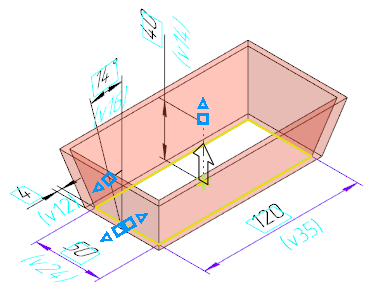
Example of creation of a extrusion element
The dimensions of sketches and operations can be both controlling and of information type (see sections: on dimensions in the model – General information. Controlling and informational dimensions in the model, about the dimensions of the sketch – Controlling and informational dimensions. Dimensions with Variables).
The value of controlling dimension of the sketch or operation can be changed. That is possible both during the operation runtime and afterwards – in the mode of display of dimensions for a selected element (see section Changing the operation dimension value). In addition, you can control the dimension value using the corresponding variable. Change of the value of controlling dimension results in the re-building of a model. Thus, the model geometry can be controlled using driving dimensions.
|
Additional options for configuring the display of dimensions of sketches and operations: •You can enable or disable the displaying the names of variables and the "control" attribute (rectangular marquee around the dimension value). •While working with the array, it is possible to enable display of dimensions of sketches and operations for each array instance. Details... |

The dimensions of sketches and operations can be displayed as detailing elements. As a result, in the model there will appear derivative dimensions, corresponding to the dimensions of sketches and operations.
The controlling dimensions of sketches and operations represented as detailing elements retain their type, i.e. remain to be controlling.
Specialties of handling dimensions of operations
On editing an operation, its numerical parameter may become dependent on a the model object. In this case, the size of an operation which represents this parameter will become of the information type and will cease to be displayed in graphic region. If this dimension was represented as a detailing element (a derivative dimension), then after editing the operation the derivative dimension will be deleted.
For example, while editing a bump operation the design method To distance was replaced with the method To object. The bump distance becomes dependent on the position of the set object – the vertex or surface. The size of the operation matching the bump distance will become of the information type and will cease to be displayed in the graphic region. The derivative dimension representing this size of operation will be deleted.
See Also
