|
Display of dimensions for a selected element |
Scroll |
To enable or disable the sketch or operation dimensions display mode, use the Dimensions of the Selected Element command  .
.

Step-by-step instructions
Select an object (a sketch or operation) whose dimensions need to be displayed. To do this, select the object in the Design Tree or specify in the graphic area any primitive belonging to the object: a face, an edge or a vertex.
Dimensions of the selected element will be displayed in the graphic area. If an operation based on a sketch is selected, the sketch dimensions will be displayed as well.
|
If the dimensions of the currently selected object are not displayed in the graphic area, it means that: •the operation has no numerical parameters expressed in linear or angular values; •the sketch does not contain any control dimensions, or the control dimension of the sketch has no variable. |

To view the dimensions of another object, select it in the Design Tree or in the graphic area.
The value of the dimension of a selected object can be changed. To do this, double-click the dimension text. The Set Dimension Value dialog will appear on the screen.
Examples of displaying dimensions for sketches and operations are shown in the Figures.
|
|
a) |
b) |
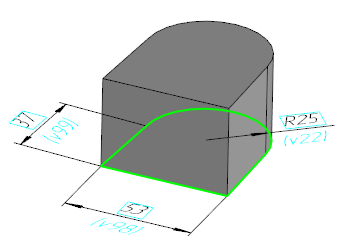
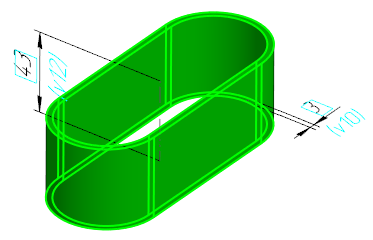
Display of dimensions for the selected object:
a) of a sketch, b) of an extrusion element
Features of display of dimensions for a selected object
1.Viewing and editing are possible only for dimensions of objects which were built directly in the model (not in any of its components). To work with a component, switch to its editing mode on a separate tab or In Place.
2.If the object dimension is already represented as a derivative dimension, the image of this dimension (duplicating the derivative one) is not generated in the dimension display mode.
3.Connecting lines of dimensions (for example, lines which conventionally display dimensioned objects, see Figure b) are displayed if the Connecting Lines option is enabled in the dimensions and designations display dialog.
See Also
