|
Display of Names of Variables in Dimensions of Sketches and Operations |
Scroll |
To enable and disable the mode of displaying the names of variables and the "controlling" attribute in the dimensions of sketches and operations, use the Names of Variables in Dimensions command  .
.

With the mode enabled, the values of control dimensions are displayed enclosed in frames, and the names of variables matching the dimensions are displayed under the dimensional lines (see Figures Example of creation of a extrusion element and Display of dimensions for the selected object).
If the value of a numerical parameter of the operation or sketch dimension is set by a constant, expression or negative number, then a value of the variable, in addition to its name, is displayed under the dimensional line of the dimension, for example: v44 = a + b.
|
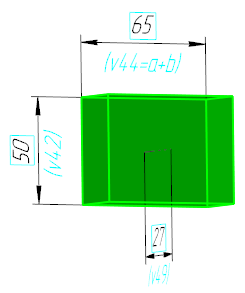
Example of expression display in the value of a variable
See Also
