|
Entering an expression |
Scroll |
To assign values to a variable using the given method, do the following actions.
1.On the Variables toolbar find the line of the variable for which you need to enter the expression.
2.Click the Expression cell for this row.
3.Enter an expression for calculation of the value of a variable and press <Enter>. An expression can be entered from the keyboard or inserted from a special dialog.
After input of the expression, the value of a variable will be automatically calculated according to the current values of the variables used in it. The result of calculation will appear in the Value cell.
In the document, an equation of the form "variable name = expression" will be created. The equation may contain no more than 80 elements – numbers, constants, variables, signs of operations, and functions. If this number is exceeded, a message appears on the screen stating that the expression is too complex.
After adding each new equation, an automatic check is performed on the resultant system of equations for the existence of cyclic dependencies and for the assignment of a variable to itself. In case of detection of one of the specified errors, a message on that is issued.
Cyclic dependence — interdependence of two equations. An elementary example of cyclic dependence — a system of the following equations:
a = b + 1,
b = a + 1.
The cyclic dependence of variables in a model may be mediated by a hierarchy of relations of objects.
For example, in the model, sketch 1 with variable X is created. Based on this sketch, an extrusion element is created, and on its face — sketch 2 with variable Y. The variables X and Y are linked by an equation (see figure).
|
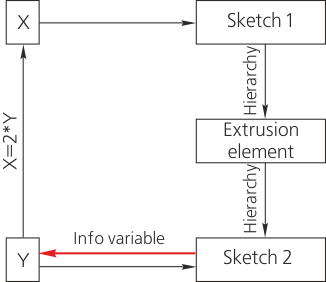
Emergence of a cyclic dependence
Until the variable Y is of Info type, there is no cyclic dependence in the model. If we edit a sketch by making the variable Y informational (to do this, it suffices to delete the fixed constraint from the respective dimension), then in the system of equations of the model, a cyclic dependence will appear: to rearrange sketch 1, we need to know the value of variable X, and for that, we need to know the value of variable Y, which can be determined only after rearranging sketch 2, but this requires rearranging the extrusion element and sketch 1.
