|
Table of Variables |
Scroll |
The table of values of external variables (a table of variables) is a table stored in the file and containing the pre-defined values of external variables of this file.
The table of variables is used when inserting a file (a component or a fragment) with external variables into another document. From the table, a row is selected, each cell of which contains the value of one external variable. These values are assigned to external variables of the file being inserted.
|
Selection of values of variables from the table is not mandatory. If necessary, you can set arbitrary values to external variables manually. If a table of variables is missing in the file, then manual input of values of variables is the only way of their editing. |

The table of variables is generated by the user when creating or editing a file that has external variables. The table can be edited later.
The table of variables is organized as follows (see the figure):
•The first row starting from the second cell contains the names of variables – table column headers.
•The first column starting from the second cell contains comments to the rows.
•The remaining cells contain the values of variables.
Thus, every row of the table starting from the second row contains a certain set of values of variables and a comment – the name of this set.
|
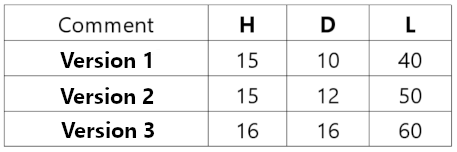
Example of a table of variables
|
Variables of the file and the tables stored in it do not necessarily need to fully match. When selecting a row of the table, values will be assigned only to those variables of the file the names of which match the table column headers. |
If a file contains external variables, you can use the function of reading external variables when creating a table of variables in this file. As a result, columns matching the external variables available in the file will be created automatically in the table.
The table of variables which is stored in the file can be written into an Excel format file. A table of variables can also be read from an Excel format file (no reference between files shall be created in this case). To make the reading possible, the Excel format file must meet certain requirements.
When creating or editing a table of variables, you can select the default method of its display when inserting a file into another document: display of the whole table or display of the first column (i.e. only comments to the rows).
