|
Polygonal objects |
Scroll |
Polygonal object is a model object used to represent in KOMPAS-3D source triangulation or tessellation data. This representation is used to describe the surfaces of 3D objects with high accuracy and a small amount of resources; transfer of tessellation data from files of interchange formats during import, etc. Representation of triangulation data in polygonal objects allows to decrease the size of model files and accelerate work with it.
See figures for examples.
|
|
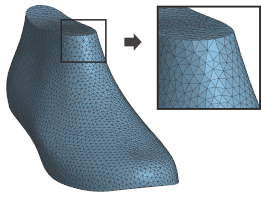
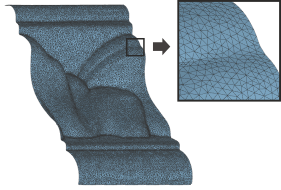
Polygonal objects
In KOMPAS-3D polygonal objects are created:
•using the import of models:
•from STL and OBJ format files,
•From JT format files, if these files contain data that can be represented as polygonal objects,
•If the application result APM FEM, intended for performing quick calculations of solid objects in the system KOMPAS-3D and visualizing the results of these calculations.
•transforming solids and/or surfaces with a special command.
In the Design tree the polygonal objects are marked by the icon  .
.
The surface of a polygonal object consists of multiple triangles with common sides. The display of triangle edges on the screen is controlled by the View – Display – Grid of polygonal objects command. By default, edges display is enabled. You can enable or disable display by calling this command (the figure demonstrates an example of changing display mode for a model created from a JT format file).
|
|
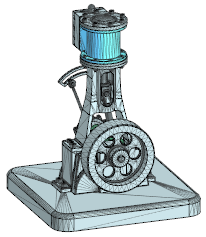
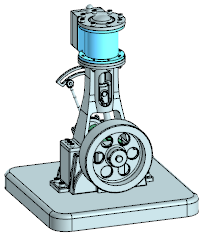
Display modes for edges of triangles that a polygonal objects surface is comprised of:
a) display is enabled; b) display is disabled
Moreover, it's available to control for polygonal objects visibility and including into calculations, selecting colors and optical properties, moving to layers.
It's possible to use polygonal objects as follows:
•as a data representation from STL, OBJ, and JT formats, requiring fewer computer resources,
•how to set up the environment when creating a new model,
•as reference geometry when building objects in the model,
•use as source data for the Free shape add-on, intended for the building of 3D models with free-form surfaces,
•for visual control of objects before 3D-printing.
If required, a polygonal object can be converted to precise geometry — a solid or a surface. Details...
Polygonal objects that are present in a model, are transferred to files of STL and JT formats during export.
