|
Process BOM Numeric Columns |
Scroll |
Sometimes when working with a BOM, you may need to perform some arithmetic operations on the values in the BOM columns (for example, in order to fill in the Cost column automatically if the number of items and the cost of each item are known).
To perform such actions, use the Service Tools library (file komlib.rtw). It is included in the standard KOMPAS–3D delivery kit and does not require a separate license.
To calculate values in columns, Connect the library Service tools, if it is not connected. Then call the Add-Ons — Service Tools — Operations with BOMs — Processing Numeric Columns command.
The dialog for processing numeric columns will be displayed on the screen (see figure).
|
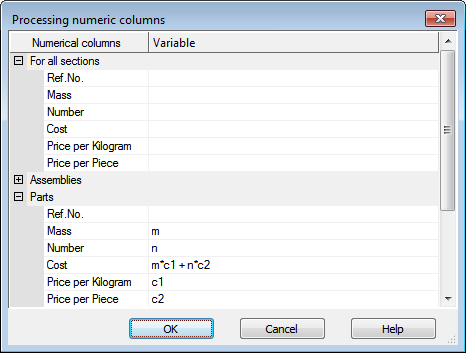
Dialog for processing numeric columns
Controls of the dialog for numeric columns processing
Variant |
Description |
|
Numeric Columns |
This column lists the numeric columns of the active BOM (columns that have the Integer or Real Number data type). The list includes both main and additional columns. Columns are grouped into sections that correspond to BOM sections. The set of sections and the structure of the columns in them depends on the style setting for the current BOM. The section For all sections is general and is displayed for the BOM of any style, but the structure of its columns also depends on the style. |
|
Variables |
In this column you must enter or edit •variable names that will be assigned to the values of the respective columns, and •equations to calculate data in other columns. |
After entering variables and equations, click the OK button in the dialog. The calculated values will be inserted in the BOM columns.
|
To recalculate the values in the columns (for example, after changing the source data), you need to re–invoke the Processing numeric columns of BOM command. |

