|
Sum Values in the BOM Columns |
Scroll |
When setting certain columns of the BOM sheet and additional columns containing numerical data, the function for summing the values in these fields can exist.
To sum numeric values in the columns, run the Sum Values in Columns command  .
.

In the dialog on the screen (see figure) you will see the results of summing up. The operation will be performed in accordance with the style settings of the current BOM. The values in the columns with the summing option enabled will be summed up. For group BOMs, the summing will be generated for each version.
|
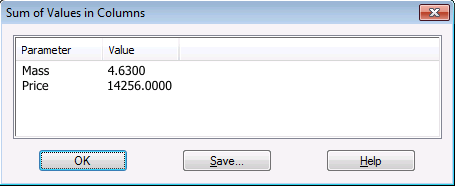
You can write the summing results to a separate text file. To do this, click the Write... button in the dialog with the results and enter the file name.
Using the Sum Values in Columns command, it is possible to calculate the mass or cost of an assembly unit, provided the corresponding additional column for each object is filled. These are only a few examples of using this command.
The summing of values in the graphs can be managed when configuring BOM style. You can enable or disable the summing function, and also indicate whether the number of items should be taken into account when summing. When summing values in the group BOM columns, the result of the command execution will be the sums of values for each version.
