|
Methods for determining the angle of rotation |
Scroll |
 Rotation at angle
The rotation angle of the section is set in the Angle field. Its value can be both positive and negative. The negative angle is counted in the opposite direction of the positive.
|
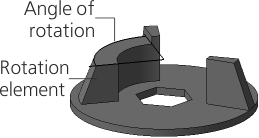
Rotation at a given angle
|
When this method is selected in the Main section of the Parameter Panel, symmetrical building is available on both sides of the section. To do this, set the Symmetrically toggle switch in position I (enabled). In this case, in the Angle field enter the total value of the rotation angle. |

 Rotation to the object
The rotation angle of the section is determined automatically by the position of a user-specified object – a vertex or surface (face, plane).
|
|
a) |
b) |
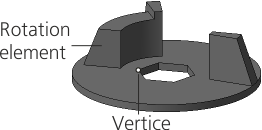
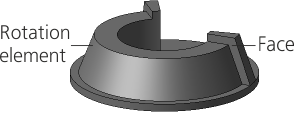
Construction of a rotation element
a) to vertex; b) to face
•When selecting a vertex, the rotation angle is calculated so that the end of the element takes the position closest to the specified vertex.
•If a face, a sketch, a contour constructed from a sketch or on a face is used as a cross section, then a rotation angle is calculated at which the surface of the element face (or its continuation) passes through the specified vertex.
•If an edge, a spatial curve or an arbitrary contour is used as a section, then the rotation angle is determined as follows. In a plane perpendicular to the axis, a circle is built with its center on the axis and passing through the specified vertex. On this circle there is a point closest to the section. The rotation angle of the cross section is taken to be equal to the angle of the arc solution between the point found and the specified vertex.
•When choosing a surface, the element revolves to the specified surface (or its continuation). The end of the element has the shape of the surface.
To specify a vertex defining the angle of rotation, click in the Object field and specify a point object, face or plane in the graphics area (you can also specify a point in the Design Tree). The name of the specified object is displayed in the Object field.
If the element is rotating to the vertex, then on the Parameter Panel there is an option Cut off. It allows you to cut off the revolution element by a plane passing through the specified vertex and axis of rotation. In this case, the element has a planar end, regardless of the shape of the section.
|
Extension of faces and surfaces of complex shape is not always possible. In this regard, pay attention to the following features. •When rotating to the vertex – if the specified vertex does not lie on the end of the received element, then in some cases the construction can be performed only when the option is on Cut off. •When rotating to the surface — if the contours of the obtained element end are beyond the specified surface, then building will only be performed correctly if this surface can be extended. |
