|
Design Type |
Scroll |
The rotation element is formed by rotating the section around the axis. Depending on the shape of the section and its position relative to the axis, as a result of the construction, either a spheroid or a toroid can be obtained.
If the section is open and represents a sketch or contour constructed from a sketch or on a flat face, and the axis of rotation lies in the section plane, it is possible to construct both a spheroid and a toroid. In this case, in the Main section of the Parameter Panel, a Build type group of buttons appears. To select the desired type of construction, click the corresponding button.
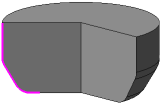
 Spheroid
When constructing a spheroid, the end points of the section are projected onto the axis of rotation. The construction of the element is based on these projections. The result is a solid element. If necessary, you can make it thin-walled using the elements of the section Thin-walled element.
|
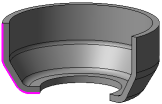
 Toroid
When constructing a toroid, only the section itself revolves. A layer of material is added to the resulting surface. The result is a hollow element with a given wall thickness. Wall parameters are configured in the section Thin-walled element.
|
|
If you need to construct a rotational element with flat ends (see the following figure), create a section containing the profile of this element, and during the operation, activate the Spheroid toggle switch. |

|
|
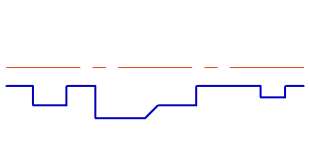
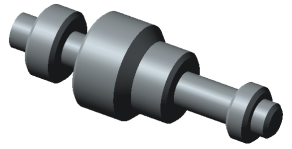
Construction of a rotational element with flat ends
