|
Thin-walled element |
Scroll |
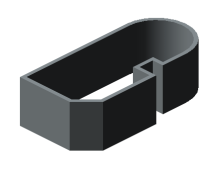
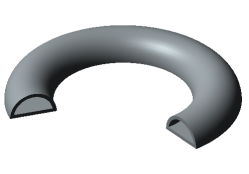
When performing extrusion, rotation, construction along sections or along a trajectory, as well as some other operations, a thin-walled element can be formed. Examples of thin-walled elements are shown in the figure.
|
|
|
|
|
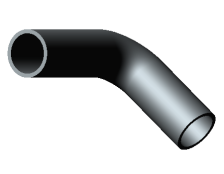
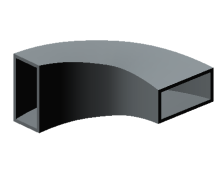
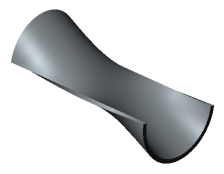
Examples of thin-walled elements
Thin-walled element is a hollow element without ends. It is formed by adding a layer of material to the surface obtained by the movement of the contour. The thickness of the material layer is set by the user.
|
The resulting element may not be exactly "thin-walled". The concept of "thin wall" is introduced conditionally to distinguish the hollow element from the solid one. |

Parameters of a thin-walled element are configured in the Thin-walled element section.
Step-by-step instructions
1.Set the Thin-walled element toggle switch in position I (enabled).
2.Determine the direction for adding a layer of material and the thickness of this layer using one of the methods listed below.
•In one direction:
•forward direction — enter a positive value in the Thickness 1 field, while Thickness 2 must be zero,
•reverse direction — enter a positive value in the Thickness 1 field, while Thickness 2 must be zero.
•In two directions — enter non-zero values in the Thickness 1 and Thickness 2 fields. One of the values may be negative. The negative thickness is measured in the opposite direction to the positive and indicates the removal of material. This allows you to build a thin-walled element, separated from the original surface (see the figure below under the letter "b"). For correct construction, the specified negative value should be less than the positive one in absolute terms.
|
The values contained in the Thickness 1 and Thickness 2 fields can be swapped using the Swap When adding a layer of material in one direction, this button actually reverses the direction. |
 button.
•Symmetrical on both sides — set the Symmetric Thickness switch to the position I (enabled) and enter the total thickness in the Thickness field. Only positive values are allowed.
|
|
a) |
b) |
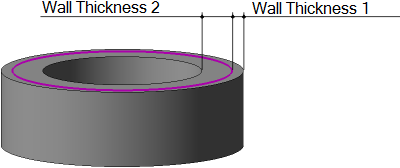
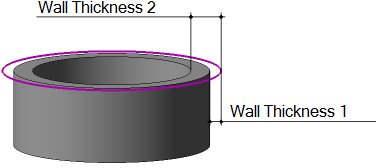
An example of constructing a thin-walled element during extrusion
(Material is added in two directions; the section is shown by a thick line)
a) wall thickness 1 and wall thickness 2 are positive;
b) wall thickness 2 has not changed, and wall thickness 1 has received the opposite sign
|
If the side walls of a thin-walled extrusion element have a slope, the specified thickness is observed in the section plane and planes parallel to it. |

