|
3D macro-element |
Scroll |
Three-dimensional macro-element — a group of model objects. Logical grouping of objects by combining them into macro-elements allows you to present the Design Tree in a more compact form. This facilitates browsing the Tree, especially when working with complex models containing multiple objects.
It is advisable to combine objects with a common functional or design purpose into macro-elements.
Objects included into a macro-element are displayed in the Design Tree as subordinate objects of this macro-element and are marked with folder icons. The procedure for working with them is the same as for the objects that are not included in macro-elements: they can be edited, excluded from the calculation, deleted, etc. In addition, the objects included in the macro-element can participate in operations (for example, building an array).
Three-dimensional macro-elements can be nested in each other. The number of nesting levels is unlimited. In other words, you can include the following items into a macro-element:
•several existing macro-elements,
•objects belonging to any of the existing macro-elements.
The figure shows the Eye lug macro-element as an example. It contains the following objects: an eye lug with external and internal bosses and a hole, as well as holes for screws. Bosses and screw holes, in their turn, are combined into the macro-elements subordinate to the Eye lug macro-element.
When a macro-element is selected in the Design Tree, all the objects of this macro-element are highlighted in the graphic range.
|
|
a) |
b) |
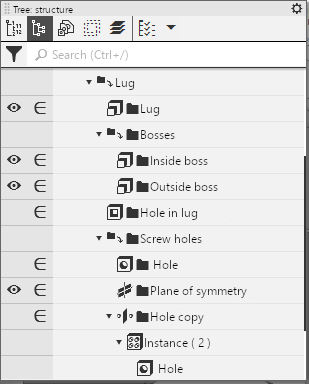

Eye lug macro-element
a) display in the Design Tree,
b) model objects included in the macro-element (highlighted)
