|
Characteristic points of objects |
Scroll |
Using characteristic points while constructing objects allows you to change their various parameters (dimensions, position, shape, etc.) without the help of a keyboard — by dragging the points with a mouse.
Characteristic points of three-dimensional objects correspond to the numerical parameters of the operation (numerical fields on the Parameter Panel). Characteristic points are displayed as colored squares on the screen. A triangle next to a square shows the possible direction of the characteristic point movement.
|
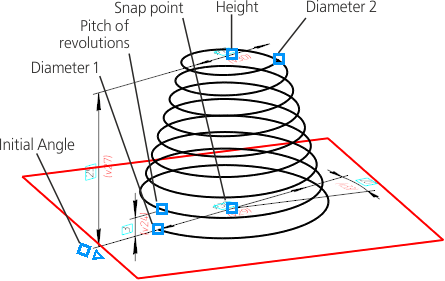
Characteristic points of the conical spiral
To change the value of any parameter, drag the corresponding characteristic point. To do this, move the cursor to the required point. After the point is selected and a title with the name and value of the parameter (or expression to calculate the value of the parameter) appears next to the point, press and hold down the left mouse button while dragging the mouse. The selected characteristic point will move following the cursor. The value of the corresponding parameter will be changed and displayed in the title next to the cursor, and a phantom of the object will be rebuilt dynamically. When the required value is obtained, release the mouse button.
The values of some parameters may deviate in either direction from the neutral position. When moving the characteristic point corresponding to such a parameter, a "-" sign is automatically added or removed before the value in the Parameter Panel field.
When moving the characteristic point, it is easier to control changes of the parameter value in the value rounding mode.
To enable this mode, press the Rounding  button on the Quick Access Toolbar. In the rounding mode, the parameter corresponding to the characteristic point to be moved, can take only integer values.
